EducationSoftwareStrategy.com
StrategyCommunity

Knowledge Base

Product

Community

Knowledge Base

TopicsBrowse ArticlesDeveloper Zone

Product

Download SoftwareProduct DocumentationSecurity Hub

Education

Tutorial VideosSolution GalleryEducation courses

Community

GuidelinesGrandmastersEvents
x_social-icon_white.svglinkedin_social-icon_white.svg
Strategy logoCommunity

© Strategy Inc. All Rights Reserved.

LegalTerms of UsePrivacy Policy
  1. Home
  2. Topics

KB36460: When creating or editing a custom group in MicroStrategy Developer 9.4.1 and 10.x, there is no way to duplicate a custom group element.


Stefan Zepeda

Salesforce Solutions Architect • Strategy


When creating or editing a custom group in MicroStrategy Developer 9.4.1 and 10.x, there is no way to duplicate a custom group element.

SYMPTOM
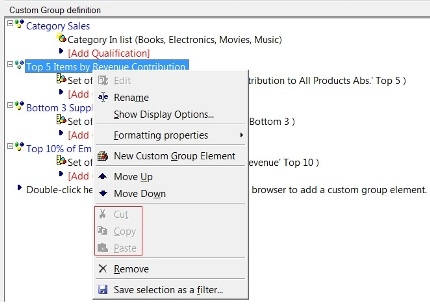
When right clicking a custom group element from the custom group editor in Strategy Developer 9.4.1 and 10.x, the 'Cut', 'Copy', and 'Paste' options are greyed out.  This makes it impossible to duplicate a custom group element.
 

ka02R000000kbr5QAA_0EM440000002DjU.jpeg

 
CAUSE
This is a known scenario with the custom group editor in Strategy Developer 9.4.1 and 10.x.
 
ACTION
Contact Strategy Technical Support for an update regarding this issue.
 
WORKAROUND
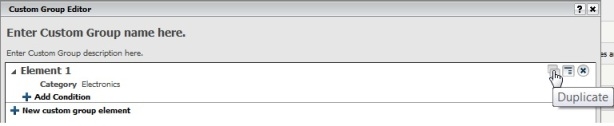
In order to duplicate a custom group element, the custom group editor in Strategy Web can be used. The custom group editor in Web provides 'Duplicate Element' functionality.
 

ka02R000000kbr5QAA_0EM440000002DjX.jpeg


Comment

0 comments

Details

Knowledge Article

Published:

June 7, 2017

Last Updated:

June 7, 2017