SYMPTOM:
There is no option to remove the report name from a text file generated within a file subscription in Strategy 9.x.
STEPS TO REPRODUCE:
1. Create a report subscription which creates a text file.
2. Execute the subscription
3. Open the text file.
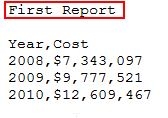
In the first row there is the report name.
WORKAROUND:
1. Run report.
2. Export report as plain text with unchecked option "Export Report title".
3. Save report.
4. Create subscription or edit the old one and save it.
5. Execute subscription.
6. Open text file.

Subscription text file should not have a report name in the first row.
ACTION:
An issue has been logged as an enhancement request. Contact Strategy Technical Support for an update on this issue.
