SYMPTOM:
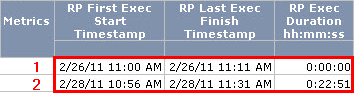
In Strategy Enterprise Manager 9.x and 10.x, the "RP Exec Duration hh:mm:ss" metric is showing incorrect results and is not calculated as the difference between "RP First Exec Start Timestamp" and "RP Last Exec Finish Timestamp".
CAUSE:
This is expected behavior. The "RP Exec Duration hh:mm:ss" metric is calculated as Sum(IS_RP_Exec_Duration(Days)) and provides the execution time of report jobs. It only records the time a report job took to execute (not counting the time in queue as well as the time spent wating for user prompted answers). It is not calculated as the difference between the "RP First Exec Start Timestamp" and "RP Last Exec Finish Timestamp". The expression for "IS_RP_Exec_Duration(Days)" is (IS_REP_EXEC_TM_MS * ((IS_CACHE_HIT_ID - 1) * -1))/86400000 and "IS_REP_EXEC_TM_MS" is directly based off of the EXECDURATION column from IS_REPORT_STATS, which only considers the time the report spent in actual execution.
In row 1 of the example above, the report hit a cache and therefore, the IS_CACHE_HIT_ID is 1. As a result, the calculation of IS_RP_Exec_Duration(Days) is zero.
In row 2, the report did not hit a cache and IS_REP_EXEC_TM_MS is 1370762 milliseconds. As a result, the calculation of IS_RP_Exec_Duration(Days) is 1370762 milliseconds or 22 minutes and 51 seconds.
ACTION:
Use the "RP Elapsed Duration hh:mm:ss" metric instead as it provides the time taken from when the job request is received to the time the job is completed and is calculated as Sum(IS_RP_Elapsed_Duration(Days)). It records the time a report job took to execute as well as the time the report was queued.
