SYMPTOM:
When viewing the Bulk Export output file using the Microsoft Excel some characters are displayed incorrectly. This is the case even though data is correctly stored in the Warehouse and is correctly displayed in Strategy Web and Developer.
Issue cannot be observed in the Microsoft Notepad and other basic text editors.
Example:
Correct form (displayed in Notepad): Aoéter
Incorrect form (displayed in MS Excel): Aoéter
CAUSE:
This issue is caused by invalid Encoding set for the Bulk Export ouput CSV file.
ACTION:
Strategy will continue to investigate and post updates as soon as they are available.
WORKAROUND:
In order to work this issue around please follow the guidelines:
1) Open exported file using the Microsoft Notepad.
2) Please check if the file Encoding is set 'UTF-8'. To check it go to File -> Save as.
3) If necessary please change Encoding to 'Unicode' and save the file.
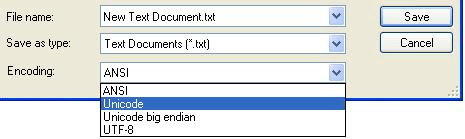
Once the encoding is set to Unicode all the characters will be correctly displayed in Microsoft Excel.
Third Party Software Installation WARNING
The third-party product(s) discussed in this technical note is manufactured by vendors independent of Strategy. Strategy makes no warranty, express, implied or otherwise, regarding this product, including its performance or reliability.
