EducationSoftwareStrategy.com
StrategyCommunity

Knowledge Base

Product

Community

Knowledge Base

TopicsBrowse ArticlesDeveloper Zone

Product

Download SoftwareProduct DocumentationSecurity Hub

Education

Tutorial VideosSolution GalleryEducation courses

Community

GuidelinesGrandmastersEvents
x_social-icon_white.svglinkedin_social-icon_white.svg
Strategy logoCommunity

© Strategy Inc. All Rights Reserved.

LegalTerms of UsePrivacy Policy
  1. Home
  2. Topics

KB36481: Users are not able to click links to update or modify configuration on MicroStrategy Mobile Admin page


Community Admin

• Strategy


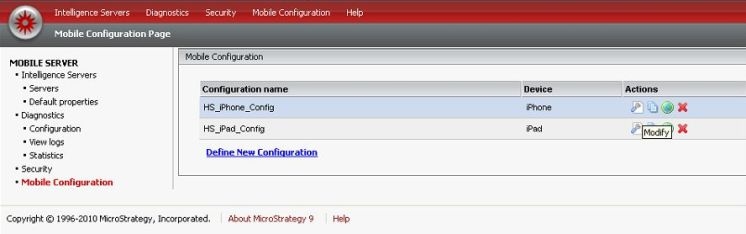
MicroStrategy Mobile Admin page does not allow user to click links, including “Modify” link and “Define New Configuration” link, to create or modify mobile configuration

SYMPTOM:
Strategy Mobile Admin page does not allow user to click links, including “Modify” link and “Define New Configuration” link, to create or modify mobile configuration, as shown below:
 

ka04W000000OgbiQAC_0EM4400000027eE.jpeg

 
CAUSE:
This issue is actually from IE browser side. Too many addons result in addon conflict which prevents the JavaScript from executing.   
ACTION:
Follow either of the following actions to get rid of the issue:

  • Use other browser instead of IE, such as Firefox or Google Chrome.
  • Reset IE settings, refer to the following technical note from Microsoft: http://support.microsoft.com/kb/923737


Comment

0 comments

Details

Knowledge Article

Published:

June 13, 2017

Last Updated:

June 13, 2017