Users trying to connect Strategy to TM1 Servers need to install the TM1 ODBO Driver. The TM1 ODBO driver should be installed on the same host as the MSTR MDX cube provider.
Installation of TM1 OLEDB Provider on Windows 64-bit
For Windows, The installation of the ODBO driver does not include all dependents dlls for tm1darsv.dll. Neither include the certificate file for SSL connections. Thus, we should install aditional components
Follow the next steps for Win-64 installation:
1. Start the installation of TM1 software.
2. Accept the license agreement.
3. Select to install server and clients
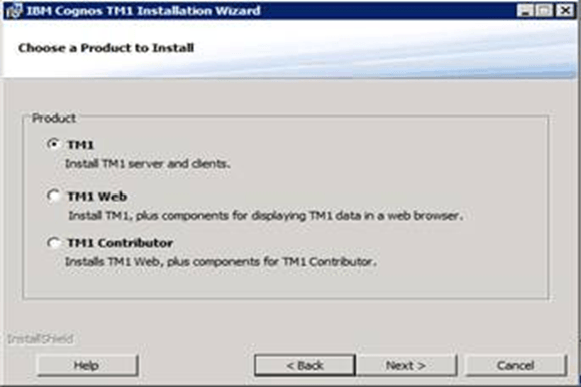
4. Select Custom installation
5. Deselect all components. Then expand all nodes and select
Click next to conitnue.
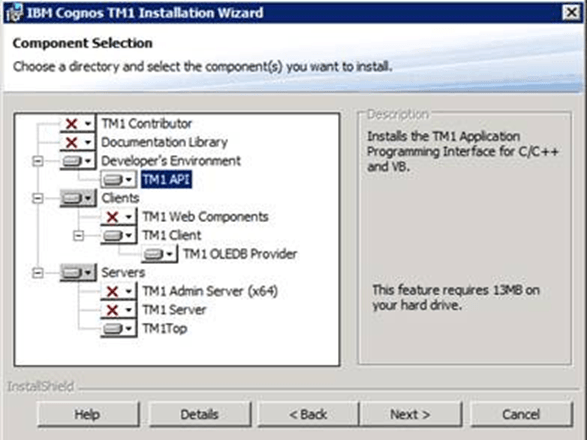
6. Click to install components
7. Click to finish installation.
8. Browse into c:\Program Files\Cognos\TM1\bin and execute regsvr32.exe tm1dasrv.dll to register the required dll
9. Browse into c:\Program Files\Cognos\TM1\bin\ssl and locate the file applixca.pem. If it is missing, copy the file from the TM1 Admin Server host at the same location.
Third Party Software Installation WARNING
The third-party product(s) discussed in this article is manufactured by vendors independent of Strategy. Strategy makes no warranty, express, implied or otherwise, regarding this product, including its performance or reliability.
