EducationSoftwareStrategy.com
StrategyCommunity

Knowledge Base

Product

Community

Knowledge Base

TopicsBrowse ArticlesDeveloper Zone

Product

Download SoftwareProduct DocumentationSecurity Hub

Education

Tutorial VideosSolution GalleryEducation courses

Community

GuidelinesGrandmastersEvents
x_social-icon_white.svglinkedin_social-icon_white.svg
Strategy logoCommunity

© Strategy Inc. All Rights Reserved.

LegalTerms of UsePrivacy Policy
  1. Home
  2. Topics

KB36563: "Suppress last level labels" option works on column labels but not row labels in MicroStrategy Developer 9.x


Stefan Zepeda

Salesforce Solutions Architect • Strategy


"Suppress last level labels" option works on column labels but not row labels in MicroStrategy Developer 9.x

SYMPTOM:
 
A graph report with attribute Year and Category in the row, metric Cost in the column as shown below:

ka02R000000kcakQAA_0EM440000002Dhs.jpeg

 
Enable "Suppress last level labels" option as shown below:
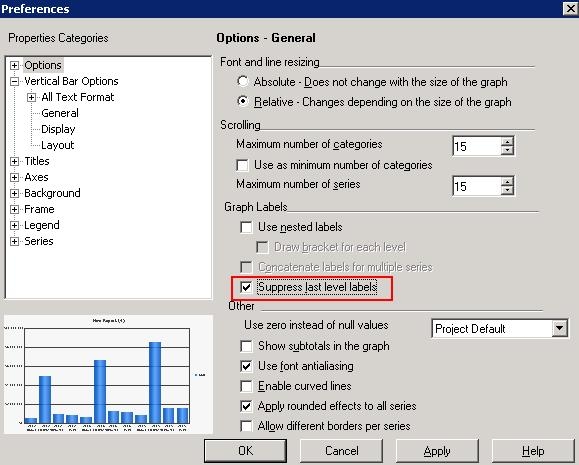
ka02R000000kcakQAA_0EM440000002Dhp.jpeg

 
Category is not suppressed. But if the graph report has attribute Year and Category in the column, metric Cost in the row, enable the "Suppress last level labels" option, then Category is suppressed as shown below:

ka02R000000kcakQAA_0EM440000002Dhq.jpeg

 
CAUSE:
 
This is a known issue in Strategy Developer 9.x.
 
ACTION:
 
Strategy will continue to investigate and post updates as soon as they are available.


Comment

0 comments

Details

Knowledge Article

Published:

April 11, 2017

Last Updated:

April 11, 2017