SYMPTOM:
When connected to a Greenplum 4.x database using the Strategy ODBC Driver for Greenplum Wire Protocol, Strategy 9.x-10.x generates SQL with brackets around column names with spaces, instead of using quotes.
For example, consider an attribute based on a column named 'TEST COLUMN' in a table named 'GREENPLUM_TEST'. If a report is built containing only that attribute, the following SQL will be generated:
Sql
select a11. AS
from greenplum_test a11
When the report is executed, it will fail with the following error:
Sample Code/Error
Error: SQL Generation Complete
QueryEngine encountered error: Execute Query failed.
Error type: Odbc error. Odbc operation attempted: SQLExecDirect. ERROR: syntax error at or near " AS
from greenplum_test a11..
Error in Process method of Component: QueryEngineServer, Project Strategy Tutorial, Job 3009, Error Code= -2147212544.
CAUSE:
This issue occurs because Strategy is enclosing column names that contain spaces with brackets. Greenplum requires such column names to be enclosed in quotes. In the example above, the SQL that would return the correct results would be as follows:
Sql
select a11."TEST COLUMN" AS "TEST COLUMN"
from greenplum_test a11
ACTION:
This is a known issue with Strategy 9.x-10.x.
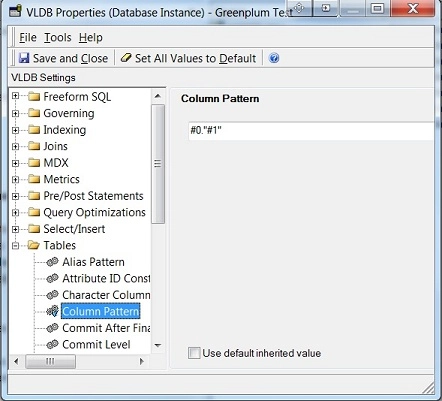
WORKAROUND:
To force Strategy to generate column names with quotes around them, the 'Column Pattern' VLDB property can be changed. To do this, edit the VLDB Properties > Tables > Column Pattern, and uncheck the 'Use Default Inherited Value' box. If this property is not visible enable advanced VLDB properties by going to the tools menu and checking the enable advanced option. Replace the default value with #0."#1"