EducationSoftwareStrategy.com
StrategyCommunity

Knowledge Base

Product

Community

Knowledge Base

TopicsBrowse ArticlesDeveloper Zone

Product

Download SoftwareProduct DocumentationSecurity Hub

Education

Tutorial VideosSolution GalleryEducation courses

Community

GuidelinesGrandmastersEvents
x_social-icon_white.svglinkedin_social-icon_white.svg
Strategy logoCommunity

© Strategy Inc. All Rights Reserved.

LegalTerms of UsePrivacy Policy
  1. Home
  2. Topics

KB36596: How to surround data in plain text and CSV format with double quotes for delivery with MicroStrategy Distribution Services


Community Admin

• Strategy


This document outlines how to surround data in plain text and CSV format with double quotes for delivery with MicroStrategy Distribution Services 9.x and newer

In versions prior to Strategy Distribution Services 9.x when a subscription to plain text or CSV was sent each field was always sent as is with no surround quotes:
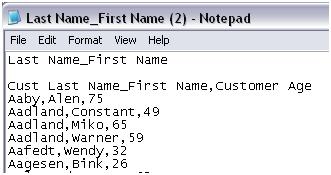
 

ka04W000000Oe3KQAS_0EM440000002AdY.jpeg

 
In Strategy Distribution Services 9.x and newer some export settings were added to provide the ability to surround each field with double quotes. This setting applies for both exporting and subscriptions.
 
The setting to surround each field in double quotes for exporting and Strategy Distribution Services subscriptions can be changed using the following steps:
  • Run the report.
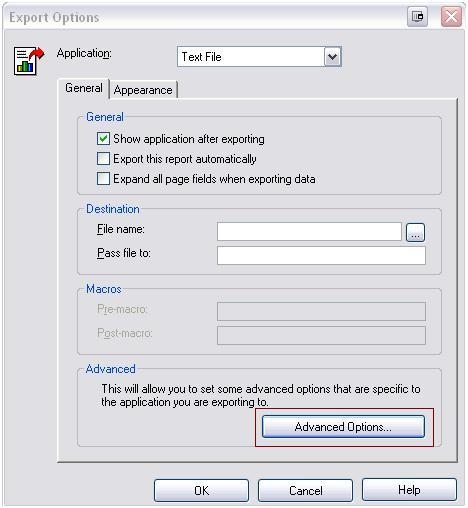
  • Open the 'Export Options' menu by selecting: Data > Export Options
     
ka04W000000Oe3KQAS_0EM440000002Adb.jpeg
  • Select ‘Advanced Options’.
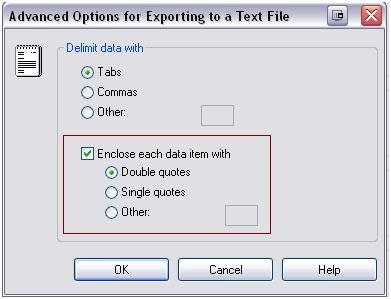
  • Choose to surround each field with double quotes, single quotes, or a different symbol by changing the option under ‘Enclose each data item with’.
     
ka04W000000Oe3KQAS_0EM440000002Ada.jpeg


Comment

0 comments

Details

Knowledge Article

Published:

April 1, 2017

Last Updated:

April 1, 2017