SYMPTOM:
In Strategy SQL Engine, when a report contains an expression-based transformation, the fact table joins itself in the report SQL statements.
STEP TO REPRODUCE:
Follow these steps to reproduce this issue with Strategy Tutorial project:
1. In Strategy Developer, create a transformation with the expression: AddDays([DAY_DATE], 3.0) as shown below:

2. Update Schema.
3. Create a metric with the formula Sum(Revenue) and add the transformation created at step1, as shown below:
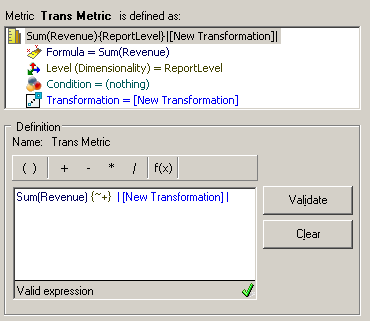
4. Create a report with the attribute Day in the row and the metric created at step3 in the column, as shown below:

5. Run the report and view the SQL generated, as shown below.

Note that the fact table is joined to itself.
CAUSE:
This behavior is working by design.
The fact table is chosen to be the transformation relationship table in the transformation editor. So it also plays the role of relationship table when SQL join happens.
ACTION:
To avoid running into this self join in report SQL statements, choose the Lookup table as the transformation relationship table in the transformation editor, as shown below:

Note that the fact table joins transformation relationship table, as shown below:

