EducationSoftwareStrategy.com
StrategyCommunity

Knowledge Base

Product

Community

Knowledge Base

TopicsBrowse ArticlesDeveloper Zone

Product

Download SoftwareProduct DocumentationSecurity Hub

Education

Tutorial VideosSolution GalleryEducation courses

Community

GuidelinesGrandmastersEvents
x_social-icon_white.svglinkedin_social-icon_white.svg
Strategy logoCommunity

© Strategy Inc. All Rights Reserved.

LegalTerms of UsePrivacy Policy
  1. Home
  2. Topics

KB36620: The SQL statement of a report with transformation does not hit warehouse fact table in the WHERE clause for the filter condition in MicroStrategy SQL Engine


Community Admin

• Strategy


This article notes how transformation metrics apply filters in SQL

SYMPTOM:
In Strategy SQL Engine, the SQL statement of a report with transformation doesn't hit warehouse fact table in the WHERE clause for the filter condition.
 
STEPS TO REPRODUCE:
Follow these steps to reproduce this issue with Strategy Tutorial project:
 

ka04W000000OhCnQAK_0EM440000002Diy.png


ka04W000000OhCnQAK_0EM440000002Dj4.png


ka04W000000OhCnQAK_0EM440000002Dj0.png


ka04W000000OhCnQAK_0EM440000002Dj2.png
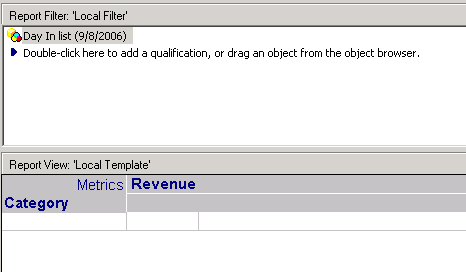
  1. Create a report with attribute Category in the row and metric Revenue in the column, put a 'day in list' attribute filter in the report filter, as shown below:  
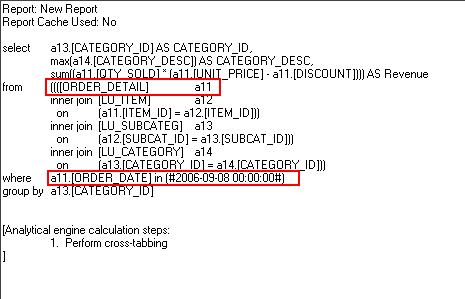
  2. Run the report and note that in the WHERE  clause of report SQL statement, the fact table is queried like this, as shown below:
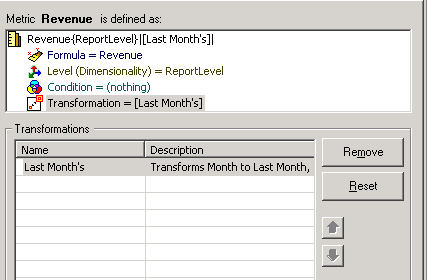
  3. Create a metric Revenue with "Last Month" transformation, as shown below:
  4. Create a report with Category and Revenue, put a date filter in the report filter.
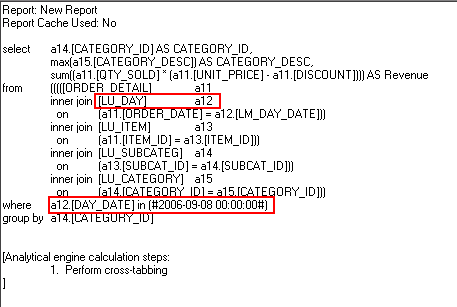
  5. Run the report and note that in the WHERE clause of report SQL statement, the transformation table is queried like this, as shown below:

  
CAUSE:
This is working by design.
Table-based transformation is realized by a join between fact table and member table defined in transformation. Then the report gets the member column in the member table as the key to filter condition.
Take the above report as an example, the LU_day is the member table which contain both Day_Date and LM_Day_Date columns. The key of transformation is to join between the fact table ORDER_DETAIL and LU_day table by matching these two keys and use the key in the member table as filter condition. Take the tables below for example:
 
ORDER_DETAIL:
date   revenue
2.1       10
3.1       20
4.1       30
 
LU_day:
Day_Date    LM_Day_Date
2.1                           1.1
3.1                           2.1
4.1                           3.1
5.1                           4.1
 
The key is to join on ORDER_DETAIL.date=LU_day.LM_Day_Date. Then use Day_Date in filter to realize retrieving data for last month. If directly use ORDER_DETAIL.date as the key, then the transformation is not working at all. 


Comment

0 comments

Details

Knowledge Article

Published:

May 30, 2017

Last Updated:

May 30, 2017