EducationSoftwareStrategy.com
StrategyCommunity

Knowledge Base

Product

Community

Knowledge Base

TopicsBrowse ArticlesDeveloper Zone

Product

Download SoftwareProduct DocumentationSecurity Hub

Education

Tutorial VideosSolution GalleryEducation courses

Community

GuidelinesGrandmastersEvents
x_social-icon_white.svglinkedin_social-icon_white.svg
Strategy logoCommunity

© Strategy Inc. All Rights Reserved.

LegalTerms of UsePrivacy Policy
  1. Home
  2. Topics

KB36665: Objects with Access Control List (ACL) set to Deny are visible to the users when editing reports through MicroStrategy Developer 9.x and 10.x


Stefan Zepeda

Salesforce Solutions Architect • Strategy


KB36665: Objects with Access Control List (ACL) set to Deny are visible to the users when editing reports through MicroStrategy Developer 9.x and 10.x

SYMPTOM:
 
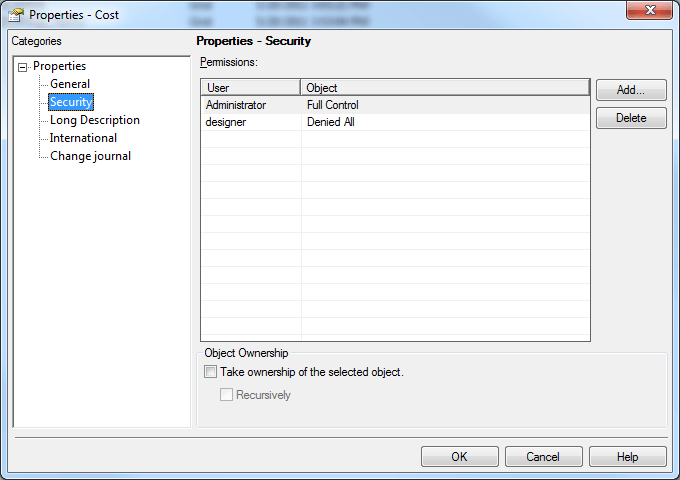
Consider that the Access Control List (ACL) on a metric is set such that a user 'designer' has 'Denied All' as shown in Strategy Developer 9.x and 10.x:
 

ka02R000000kXHlQAM_0EM440000002DiI.png

 
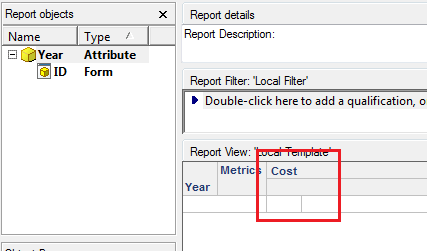
If this user edits a report which contains this 'Cost' metric from Strategy Developer 9.x and 10.x, this metric is visible on the template as shown:
 

ka02R000000kXHlQAM_0EM440000002DiK.png

 
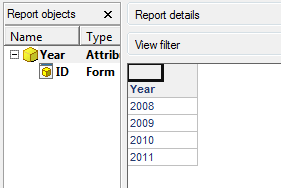
When the same user runs the report, the metric values are not shown:
 

ka02R000000kXHlQAM_0EM440000002DiM.png


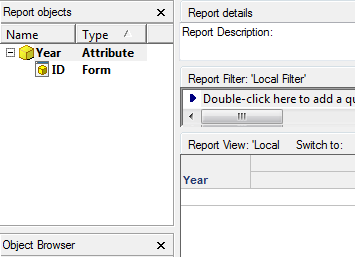
After executing the report, if the user goes back to Design view, the metric does not show up on the template:
 

ka02R000000kXHlQAM_0EM440000002DiG.png

 
CAUSE:
This behavior is by design. When reports are edited in Strategy Developer 9.x and 10.x, ACLs are not applied for objects on the template. The ACLs are only applied at execution time, which is why the metric values do not show in the report output above. Once the report has been executed, the view template of the report for this user changes, which is why on going back to Design view, the metric no longer appears on the template.
 
ACTION:
No action is necessary.


Comment

0 comments

Details

Knowledge Article

Published:

June 19, 2017

Last Updated:

June 19, 2017