After specifying the objects and SQL of a Freeform SQL report, clicking OK in Freeform SQL Editor shows the following message:
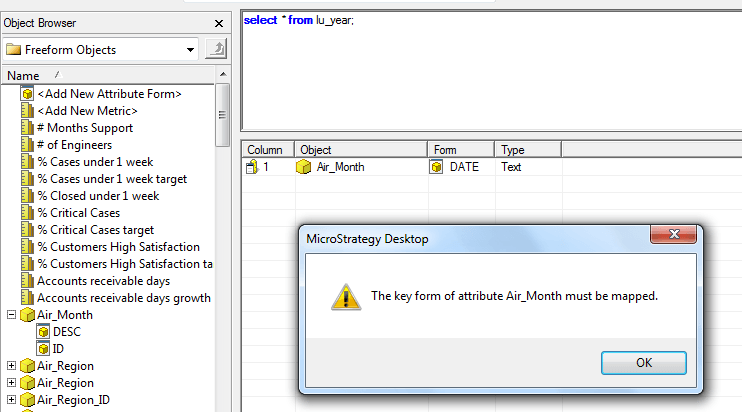
The key form of attribute xxxx must be mapped.
The attribute form which corresponds to the column to be used as the key in the attribute's lookup table is missing from the report template. Without this form, Strategy SQL Engine will not know which column to use as the table key for SQL generation.
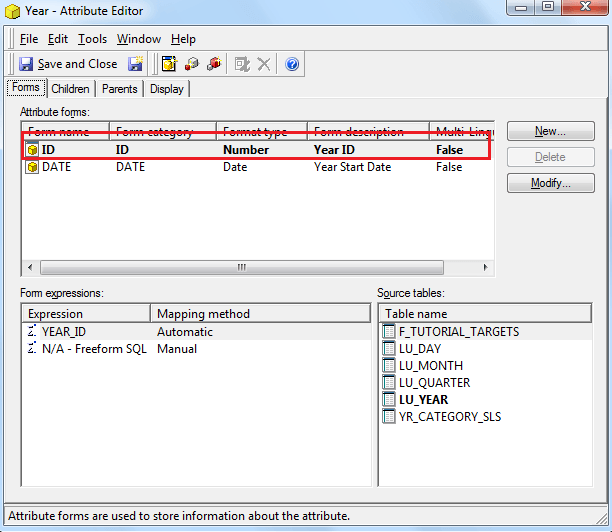
For regular project attributes, this is the form which shows up in bold when editing the attribute:
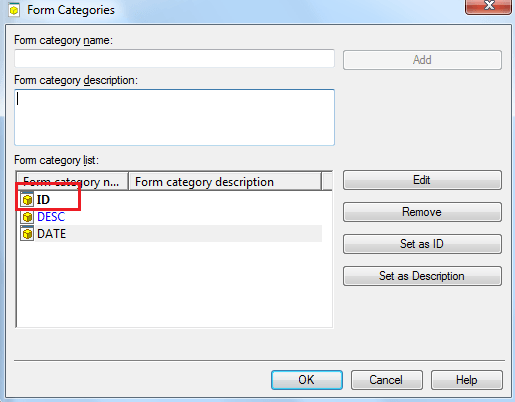
For attributes used only in freeform SQL reports, this should be the same as the form chosen to be 'Set as ID' from Schema menu > Form Categories in Strategy Developer, as shown:
Add the form corresponding to the lookup table key for the attribute(s) used in the freeform SQL report.
Note: In most cases, this will be the ID form, but this can be different depending on the form chosen in the 'Form Categories' window.
