EducationSoftwareStrategy.com
StrategyCommunity

Knowledge Base

Product

Community

Knowledge Base

TopicsBrowse ArticlesDeveloper Zone

Product

Download SoftwareProduct DocumentationSecurity Hub

Education

Tutorial VideosSolution GalleryEducation courses

Community

GuidelinesGrandmastersEvents
x_social-icon_white.svglinkedin_social-icon_white.svg
Strategy logoCommunity

© Strategy Inc. All Rights Reserved.

LegalTerms of UsePrivacy Policy
  1. Home
  2. Topics

KB36685: A shortcut added to My Shortcuts section in Training metric editor does not get saved in MicroStrategy Developer 9.x and 10.x


Stefan Zepeda

Salesforce Solutions Architect • Strategy


A shortcut added to My Shortcuts section in Training metric editor does not get saved in MicroStrategy Developer 9.x and 10.x

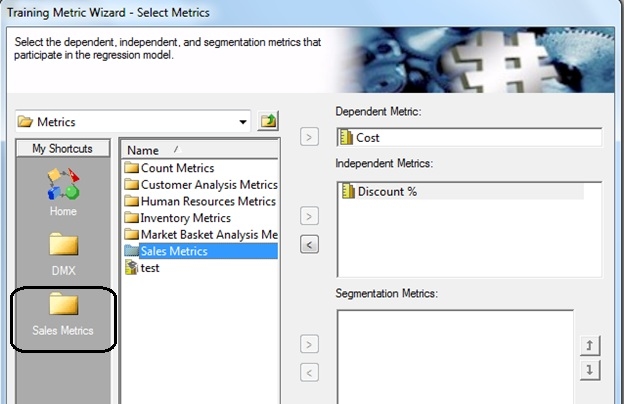
SYMPTOM:
 
In Strategy Tutorial, create a new Training Metric and add a shortcut to Sales Metric folder while creating the metric as shown below.
 

ka02R000000kc3yQAA_0EM440000002Di4.jpeg

 
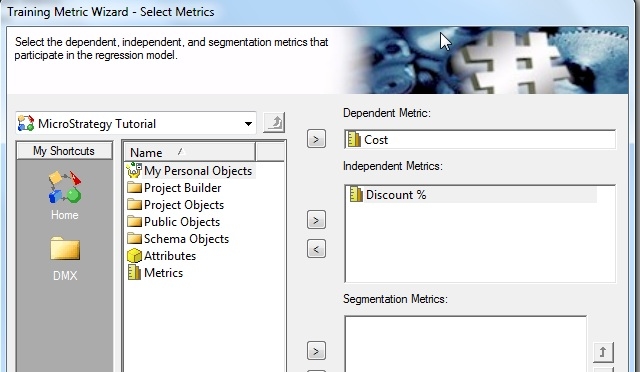
Save and close the Training Metric editor. Now if you edit that training metric again, then shortcut to the folder is lost as shown below.
 

ka02R000000kc3yQAA_0EM440000002Di1.jpeg


CAUSE:
This is a known issue in Strategy Developer 9.x and 10.x where shortcut added through Training metric editor does not get saved.
 
ACTION:
 
Please contact Strategy Technical Support regarding an update on this issue.
 
 
WORKAROUND:
The Metric editor and Training Metric editor share the same set of shortcuts. Hence if you add the shortcut through Metric editor, then it will be available through Training Metric editor as well. In above case, if the same shortcut is added using Metric editor and then if you edit the Training metric, you can see the Sales Metric folder shortcut there.


Comment

0 comments

Details

Knowledge Article

Published:

May 30, 2017

Last Updated:

May 30, 2017