EducationSoftwareStrategy.com
StrategyCommunity

Knowledge Base

Product

Community

Knowledge Base

TopicsBrowse ArticlesDeveloper Zone

Product

Download SoftwareProduct DocumentationSecurity Hub

Education

Tutorial VideosSolution GalleryEducation courses

Community

GuidelinesGrandmastersEvents
x_social-icon_white.svglinkedin_social-icon_white.svg
Strategy logoCommunity

© Strategy Inc. All Rights Reserved.

LegalTerms of UsePrivacy Policy
  1. Home
  2. Topics

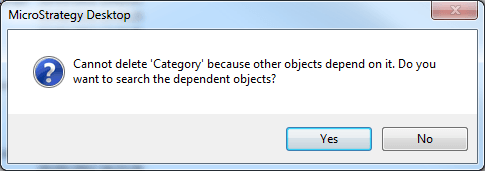
KB36747: "Cannot delete "attribute name" because other objects depend on it. Do you want to search the dependent objects?" message shows when trying to delete an attribute and the only dependent objects are logical tables and system hierarchies.


Stefan Zepeda

Salesforce Solutions Architect • Strategy


"Cannot delete "attribute name" because other objects depend on it. Do you want to search the dependent objects?" message shows when trying to delete an attribute and the only dependent objects are logical tables and system hierarchies.

Symptom
 
When trying to delete an attribute, Developer informs the user that other objects depend on it and therefore it cannot be deleted. A search for dependent objects shows only logical table and system hierarchies that should not prevent an attribute to be deleted.
 

ka02R000000kcb9QAA_0EM440000002DdJ.png


Cause
 
The attribute might have system managed objects that depend on it, that are not directly visible to the user. This can be the case if the attribute was used on a document and derived elements have been created with. Removing the attribute from the dataset of the document will not automatically clear the derived elements.
 
Action
 
Verify if derived elements or other system managed objects depend on the attribute.
 
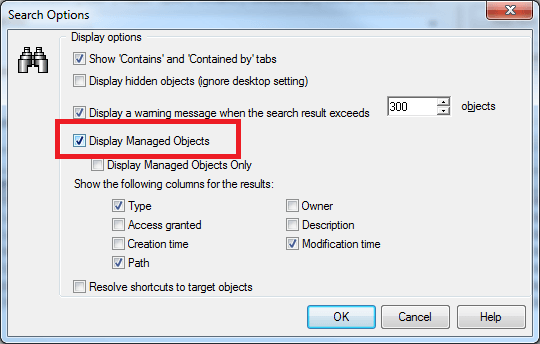
Therefore, enable the 'Display managed objects' option in the Search Editor:
ka02R000000kcb9QAA_0EM440000002DdM.png

 
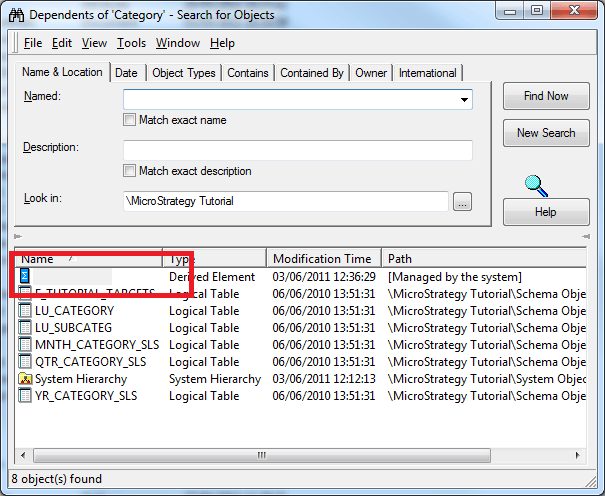
Subsequently, dependent system managed objects are returned in the search results that prevent deletion of the attribute.
ka02R000000kcb9QAA_0EM440000002DdO.png


You must manually remove the derived element from the containing documents in order to delete the attribute from your project.


Comment

0 comments

Details

Knowledge Article

Published:

April 11, 2017

Last Updated:

April 11, 2017