EducationSoftwareStrategy.com
StrategyCommunity

Knowledge Base

Product

Community

Knowledge Base

TopicsBrowse ArticlesDeveloper Zone

Product

Download SoftwareProduct DocumentationSecurity Hub

Education

Tutorial VideosSolution GalleryEducation courses

Community

GuidelinesGrandmastersEvents
x_social-icon_white.svglinkedin_social-icon_white.svg
Strategy logoCommunity

© Strategy Inc. All Rights Reserved.

LegalTerms of UsePrivacy Policy
  1. Home
  2. Topics

KB36750: Milliseconds are not displayed in a report in MicroStrategy 9.x.


Stefan Zepeda

Salesforce Solutions Architect • Strategy


A report in MicroStrategy 9.x does not display milliseconds present in a time field in the database.

SYMPTOM
A report in Strategy 9.x does not display milliseconds present in a time field in the database.
 
STEPS TO REPRODUCE
Set up datetime field in SQL Server displaying milliseconds by running the following SQL scripts:
Sql
        create table temp_test (col_1 datetime);
        insert into temp_test values(getdate());
Run the following SQL script:
Sql
                   select * from temp_test;
SQL Server displays the time showing milliseconds as follows:
              

ka02R000000kc3KQAQ_0EM440000002Dhm.jpeg

However when the select statement is run from Strategy DB Query Tool, the milliseconds are not displayed, as shown below:
             

ka02R000000kc3KQAQ_0EM440000002Dhi.jpeg

When the table is imported into a Strategy project, an attribute mapped to it, and a report with the attribute in it is executed, the time is displayed as follows:
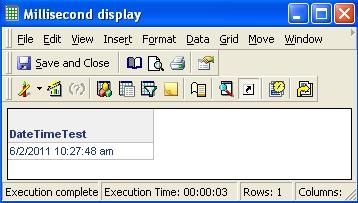
             

ka02R000000kc3KQAQ_0EM440000002Dhg.jpeg

Formatting of values does not allow for milliseconds to be displayed.
 
CAUSE
This is a known issue in Strategy 9.x
 
ACTION
Strategy will continue to investigate and post updates as soon as they are available.


Comment

0 comments

Details

Knowledge Article

Published:

May 31, 2017

Last Updated:

May 31, 2017