EducationSoftwareStrategy.com
StrategyCommunity

Knowledge Base

Product

Community

Knowledge Base

TopicsBrowse ArticlesDeveloper Zone

Product

Download SoftwareProduct DocumentationSecurity Hub

Education

Tutorial VideosSolution GalleryEducation courses

Community

GuidelinesGrandmastersEvents
x_social-icon_white.svglinkedin_social-icon_white.svg
Strategy logoCommunity

© Strategy Inc. All Rights Reserved.

LegalTerms of UsePrivacy Policy
  1. Home
  2. Topics

KB36768: In MicroStrategy Office 9.x or higher, when a documents with multiple layouts is opened in Excel, only the first layout is exported to the worksheet.


Community Admin

• Strategy


This document explains how when Report Service documents with multiple layouts is run in MicroStrategy Office, only the first layout is exported to the spreadsheet.

SYMPTOM:
This document explains how when Report Service documents with multiple layouts is run in Strategy Office, only the first layout is exported to the spreadsheet.
 
Consider the following scenario:

  • Create a Report Service document and create multiple layouts.
ka04W000000OgYVQA0_0EM4400000027bz.jpeg
  • Now open this document in Strategy Office.
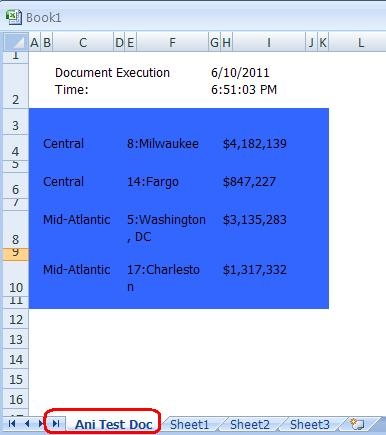
  • Notice only the first layout exported in the spreadsheet.

ka04W000000OgYVQA0_0EM4400000027c1.jpeg

 
CAUSE:
This is because the default document display setting is set to only show the default layout.
 
ACTION:
In Strategy Office, go to Options-> General-> Document-> Layout and choose ‘Display all layouts’

ka04W000000OgYVQA0_0EM4400000027bv.jpeg


Comment

0 comments

Details

Knowledge Article

Published:

June 14, 2017

Last Updated:

June 14, 2017