Strategy offers a Mode function out of the box, which allows the user to compute the mode of a particular metric or fact across a specific level.
In some situations, it is necessary for to compute the frequency of this mode, i.e., the number of occurrences of the mode value on the set of data.
There follows the procedure to create such a metric with an example in the Tutorial project.
The objective is to compute the frequency of the mode of the Units Sold metric. In this example, the Mode is to be computed over the Units Sold at Item level. However, the Mode and Frequency should be computed at report level.
The following report shows the units sold for articles in the Cameras Subcategory.
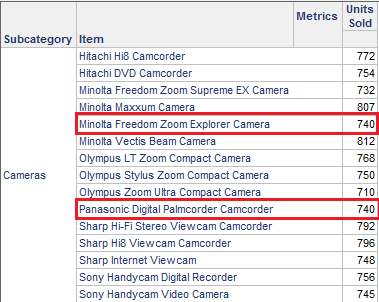
The Mode of Units Sold at Item level is 740, as there are two occurrences of this value. The expected result is that a report at subcategory level shows the Mode as 740, and the frequency as 2, as there are two items that sold this value, as shown below.

In order to create this metric, follow the steps below
1.- Create a metric Units Sold Item, whose level is modified to the lowest level at which the mode is to be computed, in this case Item.

2.- Create a Mode Units Sold metric, which computes the mode of the previous metric (not the fact!). The level is report level. This ensures that the Mode will be computed on Units Sold calculated at Item level.

3.- Create a Mode Frequency metric with formula
Sample Code/Error
Sum(IF(( = ), 1, 0)) {~}
This metric will count the number of occurrences of the Mode at report level.

