EducationSoftwareStrategy.com
StrategyCommunity

Knowledge Base

Product

Community

Knowledge Base

TopicsBrowse ArticlesDeveloper Zone

Product

Download SoftwareProduct DocumentationSecurity Hub

Education

Tutorial VideosSolution GalleryEducation courses

Community

GuidelinesGrandmastersEvents
x_social-icon_white.svglinkedin_social-icon_white.svg
Strategy logoCommunity

© Strategy Inc. All Rights Reserved.

LegalTerms of UsePrivacy Policy
  1. Home
  2. Topics

KB36778: "Executing Project Logical update on project <Project Name>" error message appears when upgrading the metadata to MicroStrategy 9.x through Configuration Wizard terminating the upgrade process.


Community Admin

• Strategy


"Executing Project Logical update on project <Project Name>" error message appears when upgrading the metadata to MicroStrategy 9.x through Configuration Wizard terminating the upgrade process.

SYMPTOM:
 
When upgrading the project to Strategy 9.x through Configuration Wizard, the following error message is thrown terminating the upgrade process completely.
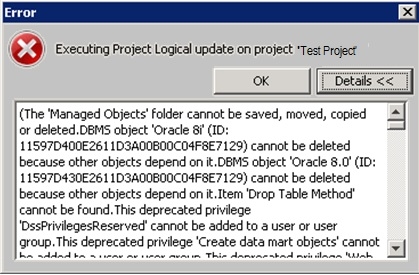
 

ka04W000000OdYpQAK_0EM440000002DhX.jpeg

 
Also following error message gets logged in MD update log:
 
2011-05-24 16:20:31.302-03:00 UNEXPECTED ERROR: (0x80041F56) This 'Project' object cannot be locked because one or more of its constituents have conflicting locks placed on them.
 
 
CAUSE:
 
Either the project itself or its configuration or one of its schema objects are already locked and hence the upgrade process is unable to put lock on the project.
 
ACTION:
 
Administrator needs to remove these locks through Strategy Developer by going to the following menus:
 
Administration -> Locking
Schema -> Unlock Schema
 
In some cases, there are locks present for that particular project in the metadata which can't be seen and unlocked through the developer. In such cases, contact Strategy Technical Support to remove the locks in the metadata.


Comment

0 comments

Details

Knowledge Article

Published:

April 12, 2017

Last Updated:

April 12, 2017