SYMPTOM:
When using Strategy Office connected to a Web Services installation to execute more than 5 reports, only 5 of the reports will execute concurrently. The remainder of the reports will display the status 'Waiting to Submit to Web Services for Execution'.
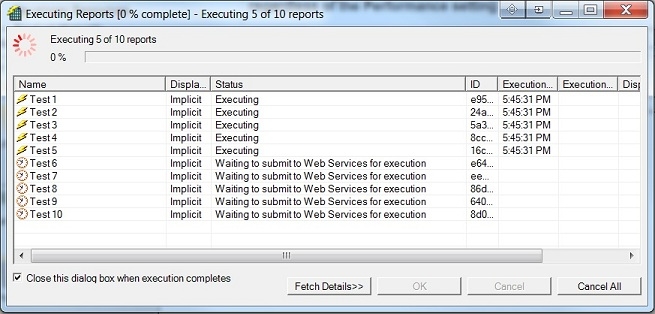
This occurs even though the Strategy Office configuration setting for maximum concurrent reports is set to more than five.

CAUSE:
This is expected behavior in Strategy Office. The maximum number of concurrent reports is set in Strategy Office client configuration settings but also limited by the number of concurrent requests allowed by Strategy Web Services. This allows an administrator to control the load on Intelligence Server by restricting how many concurrent reports may be run, while preventing a client from setting the concurrent executions arbitrarily high.
ACTION:
To increase the Web Services limit for maximum number of concurrent reports, open the MWSConfig.properties file(for JSP) or web.config file(for ASP) from the Web Services deployment directory at:
Find the line that states 'REPORTSTATEWORKINGSET=5' and change the 5 to the desired maximum number of concurrent report executions. Once this has been done, save the changes made to the file and restart the Web Services web server.
