EducationSoftwareStrategy.com
StrategyCommunity

Knowledge Base

Product

Community

Knowledge Base

TopicsBrowse ArticlesDeveloper Zone

Product

Download SoftwareProduct DocumentationSecurity Hub

Education

Tutorial VideosSolution GalleryEducation courses

Community

GuidelinesGrandmastersEvents
x_social-icon_white.svglinkedin_social-icon_white.svg
Strategy logoCommunity

© Strategy Inc. All Rights Reserved.

LegalTerms of UsePrivacy Policy
  1. Home
  2. Topics

KB36826: What does a cache status of Y mean in MicroStrategy 9.x?


Community Admin

• Strategy


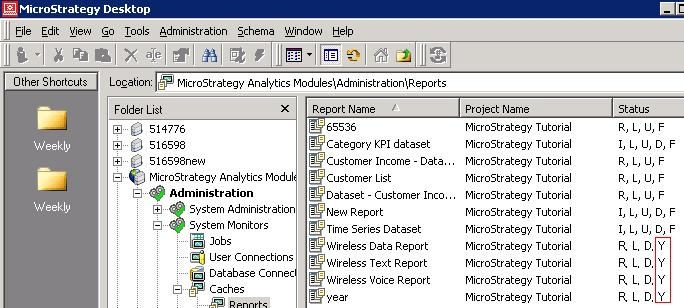
Users may see cache status Y from the Cache Monitor as shown below:
ka04W000000OeWvQAK_0EM440000002Ad4.jpeg

 
Cache status Y means the result is dirty - the cache has been updated in Intelligence Server memory since the last time it was saved to disk.
 
What is the difference betweeen cache status D and Y?
D means Cache Information is dirty, i.e. the Cache<GUID>_Info.che file has not been updated with the latest info (cache hit, View settings change etc). Y means the actual .che cache file is not updated.


Comment

0 comments

Details

Knowledge Article

Published:

June 9, 2017

Last Updated:

June 9, 2017