EducationSoftwareStrategy.com
StrategyCommunity

Knowledge Base

Product

Community

Knowledge Base

TopicsBrowse ArticlesDeveloper Zone

Product

Download SoftwareProduct DocumentationSecurity Hub

Education

Tutorial VideosSolution GalleryEducation courses

Community

GuidelinesGrandmastersEvents
x_social-icon_white.svglinkedin_social-icon_white.svg
Strategy logoCommunity

© Strategy Inc. All Rights Reserved.

LegalTerms of UsePrivacy Policy
  1. Home
  2. Topics

KB36828: "Error: You do not have Execute access to the Filter object ‘XXX’. Error in Process method of Component: ResolutionServer, Project XXX, Job XXX, Error Code= -2147214579" error occurs when running a report with no filter defined


Stefan Zepeda

Salesforce Solutions Architect • Strategy


Error: You do not have Execute access to the Filter object ‘XXX’. Error in Process method of Component: ResolutionServer, Project XXX, Job XXX, Error Code= -2147214579" error occurs when running a report with no filter defined

SYMPTOM:
When attempting to run a report, the following error occurs in Strategy Developer or Web 9.x:
 

ka02R000000kYa5QAE_0EM440000002DhS.jpeg


Error: You do not have Execute access to the Filter object ‘XXX’.
Error in Process method of Component:  ResolutionServer, Project XXX, Job XXX, Error Code= -2147214579.
 
However, the report does not have a view filter or other report filter with the same name.
 
 
CAUSE:
The term “Filter object” may also refer to a Custom Group. If the Strategy user executing the report does not have access permissions to a Custom Group which is used on the report, the report will fail to execute with the reported error.
 
 
ACTION:
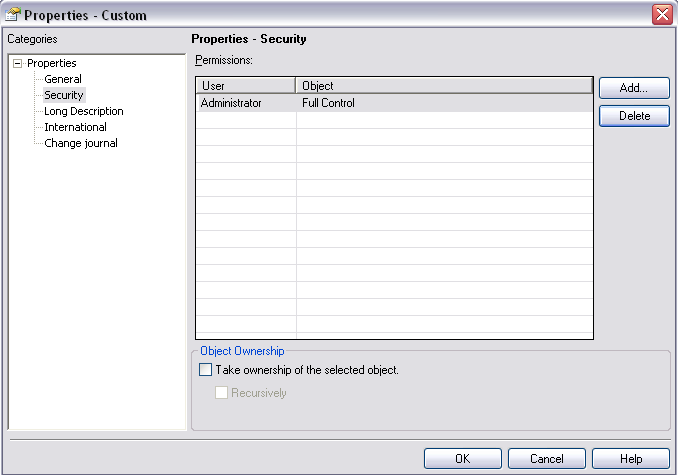
Update the access control list (ACL) of the Custom Group object. This can be changed by right clicking the custom group and selecting: Properties > Security:
 

ka02R000000kYa5QAE_0EM440000002DhJ.png

 
A Strategy user or group can then be added by selecting the Add button and choosing the Strategy users or groups with their access permission in the Select Users and Groups menu:
 

ka02R000000kYa5QAE_0EM440000002DhQ.png


Comment

0 comments

Details

Knowledge Article

Published:

June 7, 2017

Last Updated:

June 7, 2017