EducationSoftwareStrategy.com
StrategyCommunity

Knowledge Base

Product

Community

Knowledge Base

TopicsBrowse ArticlesDeveloper Zone

Product

Download SoftwareProduct DocumentationSecurity Hub

Education

Tutorial VideosSolution GalleryEducation courses

Community

GuidelinesGrandmastersEvents
x_social-icon_white.svglinkedin_social-icon_white.svg
Strategy logoCommunity

© Strategy Inc. All Rights Reserved.

LegalTerms of UsePrivacy Policy
  1. Home
  2. Topics

KB36853: User can still see the hierarchy to which the user doesn't have access in drill menu in MicroStrategy Web 9.4.1 and 10.x.


Community Admin

• Strategy


User can still see the hierarchy to which the user doesn't have access in drill menu in MicroStrategy Web 9.4.1 and 10.x.

SYMPTOM:
User can still see the hierarchy to which the user doesn't have access in the drill menu in Web.
 
STEPS TO REPRODUCE:
Follow the steps below to reproduce the issue in Strategy Tutorial project:
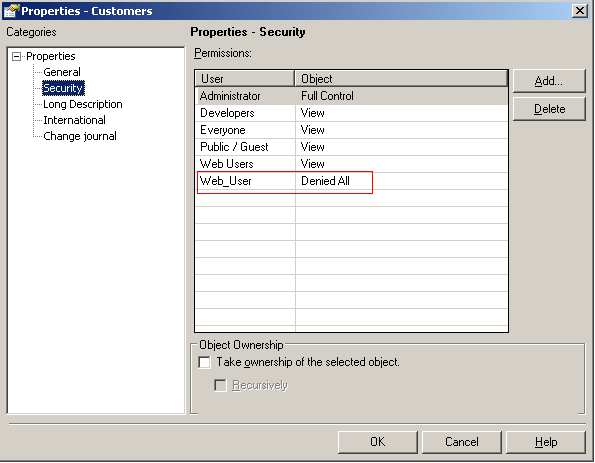
  • Create a user "Web_User" with access to Strategy Web.
  • Deny all ACL to "Customers" hierarchy for the user above, as shown below:
ka04W000000OchoQAC_0EM4400000027bM.png
  • Create a report with attribute "Year".
  • Log in with "Web_User" and execute the report created above.
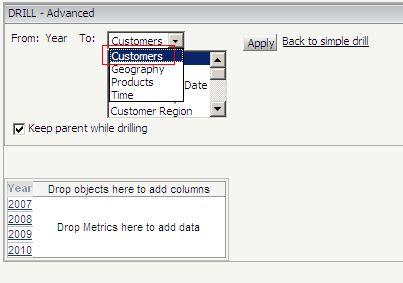
  • Right click on "Year" -> Drill -> More Options, notice the "Customers" hierarchy is still there:
     
ka04W000000OchoQAC_0EM4400000027bK.png

CAUSE: 
A possible cause if this issue is that "Web personalized drill paths" is not enabled.
 
ACTION: 
Go to Project Configuration -> Project definition ->Drilling -> Check the "Enable Web personalized drill paths" check box, as shown below:
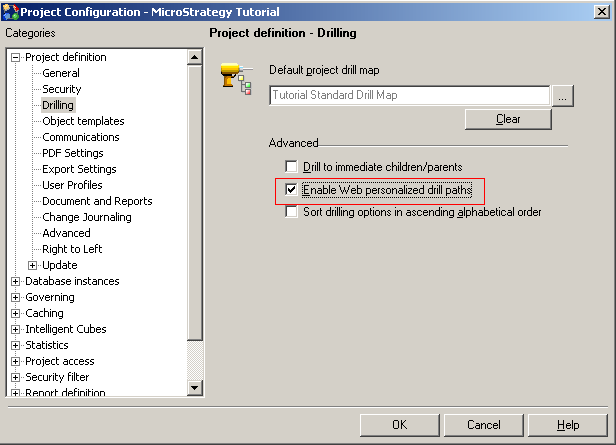
 

ka04W000000OchoQAC_0EM4400000027bI.png

 
Then the "Customers" hierarchy is not in the drill menu any more:
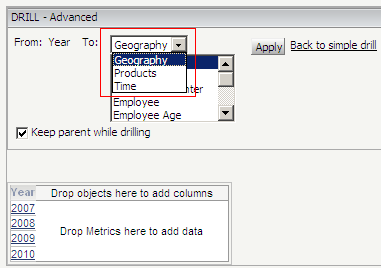
 

ka04W000000OchoQAC_0EM4400000027bO.png

Comment

0 comments

Details

Knowledge Article

Published:

July 11, 2017

Last Updated:

July 11, 2017