EducationSoftwareStrategy.com
StrategyCommunity

Knowledge Base

Product

Community

Knowledge Base

TopicsBrowse ArticlesDeveloper Zone

Product

Download SoftwareProduct DocumentationSecurity Hub

Education

Tutorial VideosSolution GalleryEducation courses

Community

GuidelinesGrandmastersEvents
x_social-icon_white.svglinkedin_social-icon_white.svg
Strategy logoCommunity

© Strategy Inc. All Rights Reserved.

LegalTerms of UsePrivacy Policy
  1. Home
  2. Topics

KB36862: Limitations on using custom groups with attribute filters, in reports using Multi-sourcing, against MDX data sources in MicroStrategy


Community Admin

• Strategy


Incorrect data is seen for metrics in a report using custom groups. The custom group element filters are defined using attributes belonging to the same hierarchy and are combined with an AND operator.

SYMPTOM:
Incorrect data is seen for metrics in a report using custom groups. The custom group element filters are defined using attributes belonging to the same hierarchy and are combined with an AND operator.
 
STEPS TO REPRODUCE:
This issue is explained below with an example based on the Strategy Tutorial project.
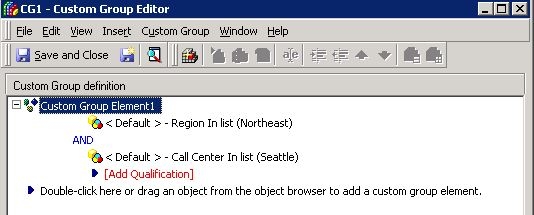
  • Consider a MDX source which brings in data on Region, Call Center and cost. The 'Region' and 'CallCenter' attributes from the MDX data-source are mapped to the 'Region' and 'CallCenter' attributes respectively in the Strategy Tutorial project.
  • Create a custom group called ‘CG1’ with only one element. The qualification for this element is defined as "Region in list (Northeast) AND Call Center in list (Seattle)”. Note that there will be no data returned for this set as there will no set where the above ‘AND’ qualification is met.
     
ka04W000000uGDkQAM_0EM440000002Dh5.jpeg
  • Set the display option for the custom group element to the last option ‘Show the element names, individual items within this element and also, expand these individual items if possible’.
     
ka04W000000uGDkQAM_0EM440000002Dh4.jpeg
  • Create a report with the custom group "CG1" and the MDX metric "Cost".
  • The report data is as displayed below. It is expected to not see individual items under the custom group element as the filter qualification for the custom group excludes all data. However, it is not expected to see a metric value corresponding to the Custom Group Element. The value displayed in the report corresponds to the grand total of the metric and is not reflective of the actual data for this custom group element.
     
ka04W000000uGDkQAM_0EM440000002DhC.jpeg


CAUSE:
This behavior is because of the way the qualification is defined within the custom group element. The qualification is based on two attributes belonging to the same hierarchy and are joined using an AND operator.
In an MDX report, when creating a filter based on attributes belonging to the same hierarchy, only an OR operator is allowed. As of Strategy 9.4.1 and 10.x, it is not possible to create a filter based on attributes belonging to the same hierarchy and join them with an AND operator. However, in this case, the filter is created using an AND condition.
ACTION:
Strategy 9.4.1 and 10.x are able to generate MDX (with a valid syntax) for this case when the filters are combined with an AND operator, but the results are incorrect (in this case, the grand total for the metric is being displayed).


KB36862


Comment

0 comments

Details

Knowledge Article

Published:

June 1, 2017

Last Updated:

January 1, 2019