Introduction:
When creating an MDX report, it is not possible to create a report filter based on an attribute description (DESC) form. Only a non-DESC form can be used in an attribute qualification, as shown below.
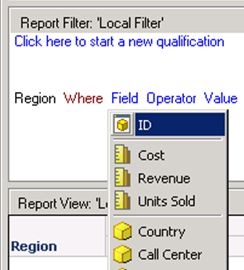
Qualifications against MDX data sources using DESC forms result in an error from the data source. Therefore, in Strategy Developer., the use of DESC forms in an attribute qualification is disabled, when creating MDX data source reports.
Limitation with Attribute qualifications in reports using Multisourcing against MDX data sources:
In reports using Multisourcing against MDX datasources, it is not possible to have an attribute qualification based on an attribute's DESC form and using a function that is supported by the MDX datasource. It is only possible to have an attribute qualification using the DESC form when using a function that is NOT SUPPORTED by the MDX datasource. This is demonstrated with an example below based on the Strategy Tutorial project.


Cause for the above behavior:
In normal reports created from Strategy Developer, there is no restriction on the attribute forms that can be used for attribute qualifications. Therefore it is possible to create attribute qualification based on an attribute DESC form even when if the report is running against a MDX datasource. When such a qualification is created using a function which is supported by the MDX datasource, the report from Step 2 is run only against the MDX datasource (as we have one datasource which meets all the requirements for running this report). However, the MDX datasource does not support such DESC form based qualifications and results in the error.
After editing the report filter to use an attribute qualification based on an attribute DESC form, but using a function that is not supported by MDX, the report is executed against the MDX datasource to get the data and then the filter qualification is applied on the relational database. The SQL view of the report from Step 4 is shown below. The data which is retrieved from the MDX data source is inserted in a temporary table on the relational database and then the attribute qualification is applied.
with set as '{..members}'

select {.} on columns,

non empty dimension properties . on rows

from

cell properties CELL_ORDINAL, FORMATTED_VALUE, VALUE, FORMAT_STRING


create table ZZOP00 (

 REGION_ID SHORT,

 REGION_NAME0 TEXT(50),

 WJXBFS1 TEXT(200))


insert into ZZOP00 values ()


select pa11. AS REGION_ID,

 pa11. AS REGION_NAME0,

 pa11. AS WJXBFS1

from  pa11

where pa11. like 'South%'

drop table ZZOP00