EducationSoftwareStrategy.com
StrategyCommunity

Knowledge Base

Product

Community

Knowledge Base

TopicsBrowse ArticlesDeveloper Zone

Product

Download SoftwareProduct DocumentationSecurity Hub

Education

Tutorial VideosSolution GalleryEducation courses

Community

GuidelinesGrandmastersEvents
x_social-icon_white.svglinkedin_social-icon_white.svg
Strategy logoCommunity

© Strategy Inc. All Rights Reserved.

LegalTerms of UsePrivacy Policy
  1. Home
  2. Topics

KB36869: Newly created users' profile folder is exposed to Everyone in MicroStrategy Developer 9.x when show hidden objects option has been enabled.


Stefan Zepeda

Salesforce Solutions Architect • Strategy


Newly created users' profile folder is exposed to Everyone in MicroStrategy Developer 9.x when show hidden objects option has been enabled

SYMPTOM:
 
Newly created user's profile folder is exposed to everyone when "show hidden objects" option is enabled In Strategy Developer 9.x.
 
To show hidden objects, refer to below technical note:
KB31452: How to display a project's hidden folders in MicroStrategy Narrowcast 8.x and 9.0.
 
Reproduce Steps in Tutorial Project:

  • Create new user TEST with Analyst and Designer privileges.
  • Login with Administrator. Notice that the user profile folder list is as shown below:
ka02R000000kcZSQAY_0EM440000002Dft.jpeg
  • Login with another user guest. The newly built user's profile "TEST (TEST)" is visible, as shown below:    
ka02R000000kcZSQAY_0EM440000002Dfz.jpeg
  • Login with User_French. The newly built user's profile "TEST (TEST)" is visible, as shown below:                                
ka02R000000kcZSQAY_0EM440000002Dg5.jpeg

CAUSE:
 
It is a known issue in Strategy Developer 9.x for existing projects (the project is created the same time with the project source, not the project added to the project source at a later time).
For newly built project, only Administrator can view the profile folder, as shown below:                           

ka02R000000kcZSQAY_0EM440000002Dfv.jpeg


ACTION:
 
Manually remove everyone group from the access control list (ACL) of Profile folder for the newly built user in the existing project.  After this step, new users added will not be able to see other users' profile folders. 
 
 
WORKAROUND:
 

  • Login with administrator, and RMC(right mouse click) the folder “Profiles"->Security and manually remove the ACL for everyone group, as shown below:                                                                                
ka02R000000kcZSQAY_0EM440000002Dg1.jpeg
  • Login with User_French, TEST folder is not visible any more, as shown below:                                                                                                                                                                          
ka02R000000kcZSQAY_0EM440000002Dg3.jpeg

 
NOTE:
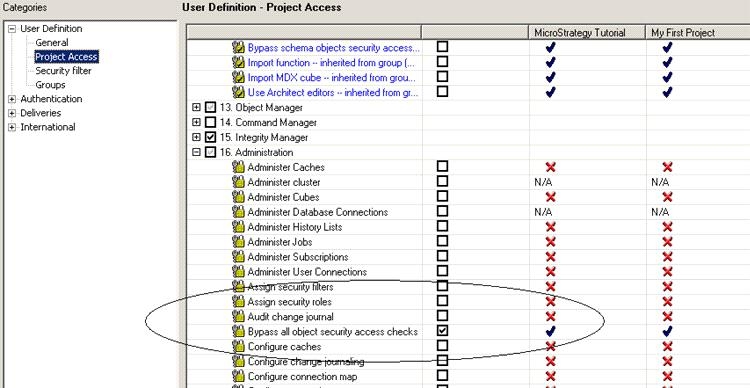
If login with architect, the user TEST's profile is still viewable because the user Architect has the privilege “Bypass all object security access checks”  which means no ACL(access control list) will be applied, as shown below:
ka02R000000kcZSQAY_0EM440000002Dfx.jpeg


Comment

0 comments

Details

Knowledge Article

Published:

April 12, 2017

Last Updated:

April 12, 2017