EducationSoftwareStrategy.com
StrategyCommunity

Knowledge Base

Product

Community

Knowledge Base

TopicsBrowse ArticlesDeveloper Zone

Product

Download SoftwareProduct DocumentationSecurity Hub

Education

Tutorial VideosSolution GalleryEducation courses

Community

GuidelinesGrandmastersEvents
x_social-icon_white.svglinkedin_social-icon_white.svg
Strategy logoCommunity

© Strategy Inc. All Rights Reserved.

LegalTerms of UsePrivacy Policy
  1. Home
  2. Topics

KB36882: New feature in MicroStrategy Object Manager 9.0.2: View/Edit package contents


Community Admin

• Strategy


New feature in MicroStrategy Object Manager 9.0.2: View/Edit package contents

In Strategy Object Manager 9.0.2, it is possible to view or edit the contents of an object manager package (.mmp) file. The new feature allows administrators to:

  • Modify the Definition rules
  • Change the object name in the destination project
  • Remove any objects if they are not to be migrated
  • Simply view the contents of the package

The procedure to import and view the package is as follows:
 
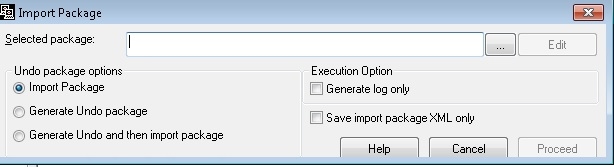
1. Once user logs into the project and goes to Tools (menu on top) -> Import package, the window pops up as shown below:
 

ka04W000001MKkXQAW_0EM440000002Dgy.jpeg

 
2. Browse to the saved location and select the package
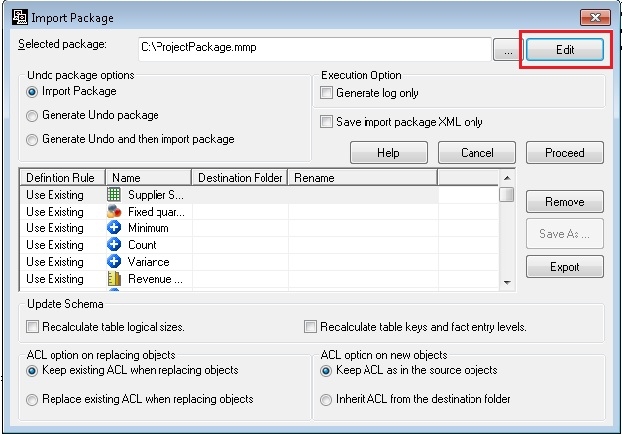
3. Once the package is selected, press Edit button on top right corner which will show you the contents of .mmp file as shown below:
 

ka04W000001MKkXQAW_0EM440000002Dgw.jpeg

 
 Please note that if you make any changes in the package, then the package needs to be saved by clicking on “Save As” button before importing it.


Comment

0 comments

Details

Knowledge Article

Published:

April 11, 2017

Last Updated:

April 11, 2017