EducationSoftwareStrategy.com
StrategyCommunity

Knowledge Base

Product

Community

Knowledge Base

TopicsBrowse ArticlesDeveloper Zone

Product

Download SoftwareProduct DocumentationSecurity Hub

Education

Tutorial VideosSolution GalleryEducation courses

Community

GuidelinesGrandmastersEvents
x_social-icon_white.svglinkedin_social-icon_white.svg
Strategy logoCommunity

© Strategy Inc. All Rights Reserved.

LegalTerms of UsePrivacy Policy
  1. Home
  2. Topics

KB36903: "Metric Column Options" property in metric editor is grayed out for a user in MicroStrategy Developer 9.4.1 and 10.x


Stefan Zepeda

Salesforce Solutions Architect • Strategy


"Metric Column Options" property in metric editor is grayed out for a user in MicroStrategy Developer 9.4.1 and 10.x

SYMPTOM
When a user goes to Tools -> Advanced Settings -> Metric Column Options property in a metric editor in Strategy Developer 9.4.1 and 10.x this property is grayed out as shown below:

ka02R000000kcaIQAQ_0EM440000002Dgm.jpeg

 
CAUSE
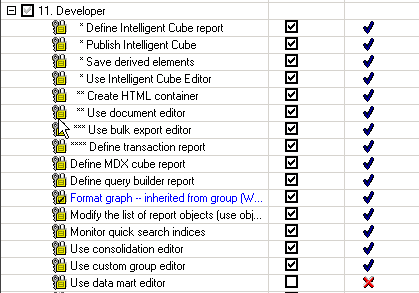
"Metric Column Options" property allows a user to view and edit metric column names for use in data mart tables and SQL generation and requires "Use data mart editor" privilege. In this case, the user does not have "Use data mart editor" privilege available under Developer section.
ka02R000000kcaIQAQ_0EM440000002J6U.png

ACTION
Giving "Use data mart editor" privilege available under the Developer privileges section will resolve the issue.  


Comment

0 comments

Details

Knowledge Article

Published:

April 11, 2017

Last Updated:

April 11, 2017