EducationSoftwareStrategy.com
StrategyCommunity

Knowledge Base

Product

Community

Knowledge Base

TopicsBrowse ArticlesDeveloper Zone

Product

Download SoftwareProduct DocumentationSecurity Hub

Education

Tutorial VideosSolution GalleryEducation courses

Community

GuidelinesGrandmastersEvents
x_social-icon_white.svglinkedin_social-icon_white.svg
Strategy logoCommunity

© Strategy Inc. All Rights Reserved.

LegalTerms of UsePrivacy Policy
  1. Home
  2. Topics

KB36924: Standard deviation metric does not return correct values in MicroStrategy 10.x


Community Admin

• Strategy


Standard deviation metric does not return correct values in MicroStrategy 10.x

SYMPTOM:
 
Standard deviation metric does not return correct values in Strategy 10.x
 
STEPS TO REPRODUCE:
 
Follow the steps below to reproduce the issue using Strategy tutorial project:

  • Create a standard deviation metric (SD) with metric definition "Stdev(Profit) {~, Month}". This is to apply standard deviation function on the out-of -the-box Profit metric and set the metric level to <Report Level> and <Month, Grouping None>.
  • Create a report with attribute Region, Year, Month, and metric Profit, SD (the metric created at Step #1).
  • Execute the report, notice that SD returns the same value for every month, as shown below:
ka04W000000OhMdQAK_0EM440000002Dg9.png

CAUSE:
 
The behavior is working as designed.
 
When calculating metric SD, SQL engine will first calculate its inner metric Profit, which is at report level, so here data is already aggregated to Month level. The value returned is actually the standard deviation value of a whole year's Profit data.
 
ACTION:
 
Define the correct metric level for the inner metric Profit. To get the standard deviation value for each month, the inner metric should be able to return values at Day level.
 
Inner Metric shoule be Sum(Profit) {~, Day}, as shown below:

ka04W000000OhMdQAK_0EM440000002DgB.png

 
For the SD metric, set its level to report level (Stdev() {~}), as shown below:
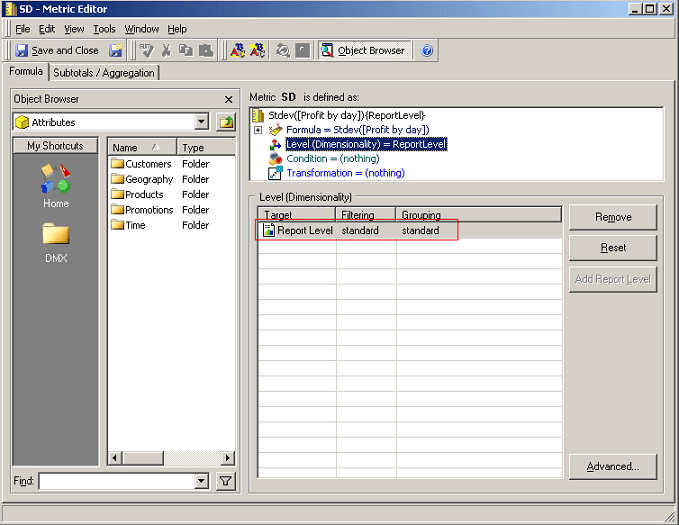
ka04W000000OhMdQAK_0EM440000002DgG.png


After applying the modification above, correct data is returned, as shown below:
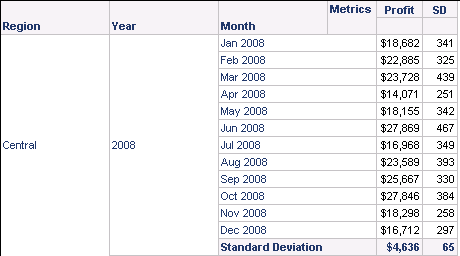
ka04W000000OhMdQAK_0EM440000002Dg7.png

 
NOTE: For best practice, always define metric level for the inner metric, because engine aggregates the inner metric before applying the outer function and the inner metric level affects the selection of base fact table used for aggregation.


Comment

0 comments

Details

Knowledge Article

Published:

May 24, 2017

Last Updated:

May 24, 2017