EducationSoftwareStrategy.com
StrategyCommunity

Knowledge Base

Product

Community

Knowledge Base

TopicsBrowse ArticlesDeveloper Zone

Product

Download SoftwareProduct DocumentationSecurity Hub

Education

Tutorial VideosSolution GalleryEducation courses

Community

GuidelinesGrandmastersEvents
x_social-icon_white.svglinkedin_social-icon_white.svg
Strategy logoCommunity

© Strategy Inc. All Rights Reserved.

LegalTerms of UsePrivacy Policy
  1. Home
  2. Topics

KB36930: When updating the project status through Command Manager 9.x, unicode special characters are improperly displayed and show as boxes.


Community Admin

• Strategy


KB describes how to alter script in Command Manager to update project status in French

SYMPTOM:
When updating the project status through Desktop 9.x with French characters there is no issue with the display.  However, when updating the project status through Command Manager with a .htm file, French characters show up as boxes.
 
The script in Command Manager to update the project status is as follows:


ALTER PROJECT CONFIGURATION STATUS "c:\test2.htm" SHOWSTATUS TRUE IN PROJECT "Strategy Tutorial";

 
Notice that after the script is run and the changes take place, the display in Desktop will show boxes instead of the French characters as shown below :
 

ka04W000000OhM9QAK_0EM440000002Ac8.png


This is how the characters should be displayed:
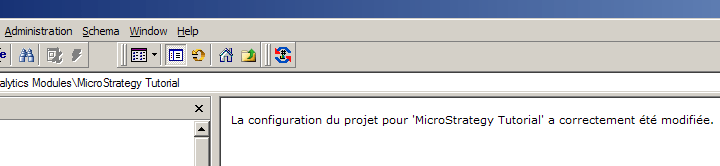
 

ka04W000000OhM9QAK_0EM440000002AcD.png

 
CAUSE:
One possible cause of this issue is that the HTML file used to import the status is invalid causing the foreign characters not to properly display.  This is caused by the format in which the file is saved.
 
ACTION:
Save the file as UNICODE and then change the file extension back to .htm.


Comment

0 comments

Details

Knowledge Article

Published:

May 24, 2017

Last Updated:

May 24, 2017