EducationSoftwareStrategy.com
StrategyCommunity

Knowledge Base

Product

Community

Knowledge Base

TopicsBrowse ArticlesDeveloper Zone

Product

Download SoftwareProduct DocumentationSecurity Hub

Education

Tutorial VideosSolution GalleryEducation courses

Community

GuidelinesGrandmastersEvents
x_social-icon_white.svglinkedin_social-icon_white.svg
Strategy logoCommunity

© Strategy Inc. All Rights Reserved.

LegalTerms of UsePrivacy Policy
  1. Home
  2. Topics

KB36956: How to Enable or Disable Match Case for Prompts using MicroStrategy Web 9.x and above


Community Admin

• Strategy


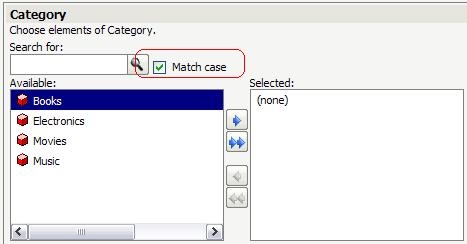
When running certain prompt types in MicroStrategy Web 9.x and above, the interface offers a search option followed by a Match Case check box. This functionality allows users to search for specific elements within the prompt available answers. To allow more flexibility, the check box allows the user to restrict the search results only to those that match the case entered

When running certain prompt types in Strategy Web 9.x and above, the interface offers a search option followed by a Match Case check box.
 
This functionality allows users to search for specific elements within the prompt available answers. To allow more flexibility, the check box allows the user to restrict the search results only to those that match the case entered, as shown below:
ka04W000000OhUAQA0_0EM4400000027bj.jpeg

It is possible to control whether this option is enabled or disabled by default for all prompts by setting the following preference in Strategy Web :

ka04W000000OhUAQA0_0EM4400000027ba.jpeg

 
Preferences > Project Defaults > Prompts > Case sensitivity:  Match case sensitivity by default


Comment

0 comments

Details

Knowledge Article

Published:

May 17, 2017

Last Updated:

May 17, 2017