EducationSoftwareStrategy.com
StrategyCommunity

Knowledge Base

Product

Community

Knowledge Base

TopicsBrowse ArticlesDeveloper Zone

Product

Download SoftwareProduct DocumentationSecurity Hub

Education

Tutorial VideosSolution GalleryEducation courses

Community

GuidelinesGrandmastersEvents
x_social-icon_white.svglinkedin_social-icon_white.svg
Strategy logoCommunity

© Strategy Inc. All Rights Reserved.

LegalTerms of UsePrivacy Policy
  1. Home
  2. Topics

KB36980: No projects appear after successfully logging into MicroStrategy Web 9.x and newer with a "Server trying to send reply, but SendToChannel failed" error recorded in the DSSErrors.log


Community Admin

• Strategy


No projects appear after successfully logging into MicroStrategy Web 9.x and newer

SYMPTOM:
No projects appear after successfully logging into Strategy Web 9.x and newer. In the DSSErrors.log the following error is logged around the time of log on:
Sample Code/Error
2011-06-03 15:34:21.174-04:00 Server trying to send reply, but SendToChannel failed.
 
CAUSE:
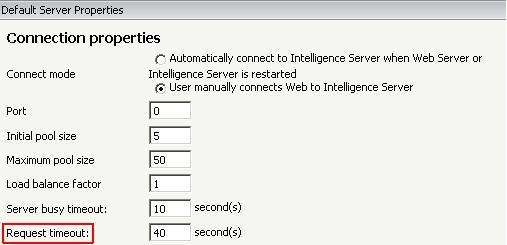
This issue is caused because the Strategy Intelligence Server 9.x and newer tried to send back the reply on a TCP/IP connection that had since been closed by the web server due to the Web `Request Timeout` setting being reached. This is most likely to occur during times of high load.
 
ACTION:
Increase the Web 'Request Timeout' setting on the Strategy Web Administrator page under the Default Server Properties as shown below:
 

ka04W000000OgkzQAC_0EM4400000027aP.jpeg


Comment

0 comments

Details

Knowledge Article

Published:

June 12, 2017

Last Updated:

June 12, 2017