EducationSoftwareStrategy.com
StrategyCommunity

Knowledge Base

Product

Community

Knowledge Base

TopicsBrowse ArticlesDeveloper Zone

Product

Download SoftwareProduct DocumentationSecurity Hub

Education

Tutorial VideosSolution GalleryEducation courses

Community

GuidelinesGrandmastersEvents
x_social-icon_white.svglinkedin_social-icon_white.svg
Strategy logoCommunity

© Strategy Inc. All Rights Reserved.

LegalTerms of UsePrivacy Policy
  1. Home
  2. Topics

KB36981: In MicroStrategy Developer 9.x, the option to format the layout of Graph Legend is grayed out.


Stefan Zepeda

Salesforce Solutions Architect • Strategy


In MicroStrategy Developer 9.x, the option to format the layout of Graph Legend is grayed out.

SYMPTOM:
In Strategy Developer 9.x, consider the following scenario:
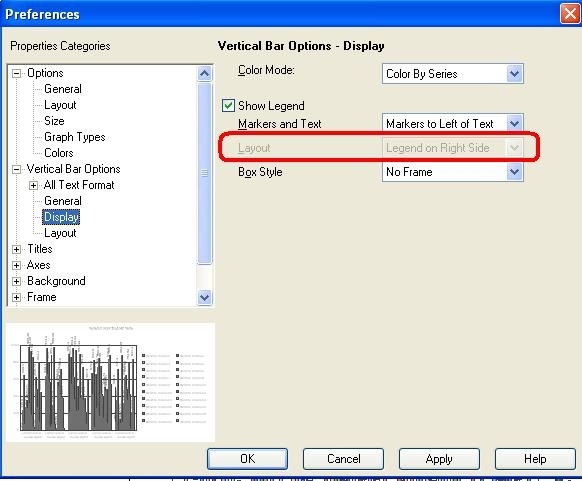
  • Create a vertical bar graph report.
  • Go to Graph-> Preferences-> Vertical Bar Options-> Display.
  • The Layout option to format the Legend appears grayed out.
ka02R000000kVfpQAE_0EM440000002DgR.jpeg

 
CAUSE:
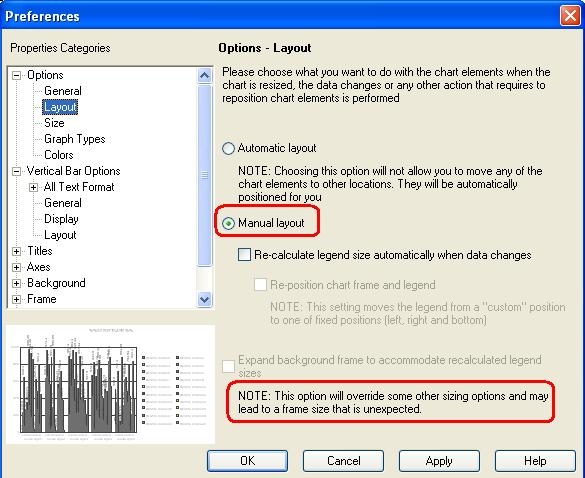
The reason the Vertical Bar Options > Display > Legend appears to be disabled is that the Layout is chosen to be Manual, as shown:
 

ka02R000000kVfpQAE_0EM440000002DgT.jpeg

The NOTE at the bottom states that choosing Manual overrides other sizing options, which includes the Legend selection.
 
ACTION:
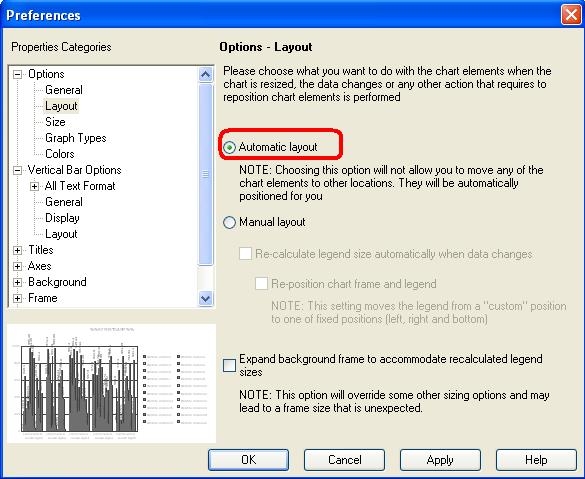
In order to have the Layout option enabled, switch the Options-> Layout to Automatic.
 

ka02R000000kVfpQAE_0EM440000002Dge.jpeg

 
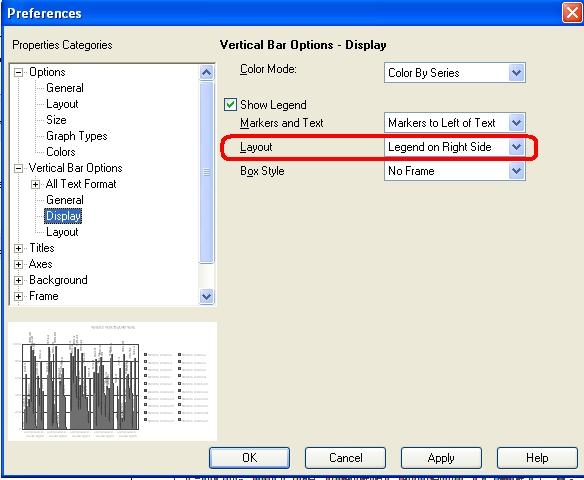
The Legend Layout will now be enabled:
ka02R000000kVfpQAE_0EM440000002DgV.jpeg

Comment

0 comments

Details

Knowledge Article

Published:

May 30, 2017

Last Updated:

May 30, 2017