EducationSoftwareStrategy.com
StrategyCommunity

Knowledge Base

Product

Community

Knowledge Base

TopicsBrowse ArticlesDeveloper Zone

Product

Download SoftwareProduct DocumentationSecurity Hub

Education

Tutorial VideosSolution GalleryEducation courses

Community

GuidelinesGrandmastersEvents
x_social-icon_white.svglinkedin_social-icon_white.svg
Strategy logoCommunity

© Strategy Inc. All Rights Reserved.

LegalTerms of UsePrivacy Policy
  1. Home
  2. Topics

KB36999: "The Managed Objects folder cannot be saved, moved, copied or deleted. Item XXX cannot be found. The deprecated privilege XXX cannot be added to a user or user group" error occurs when upgrading a MicroStrategy project.


Stefan Zepeda

Salesforce Solutions Architect • Strategy


This article describes an upgrade issue due to invalid characters in the WebPromptAvailableStyles property set

SYMPTOM:
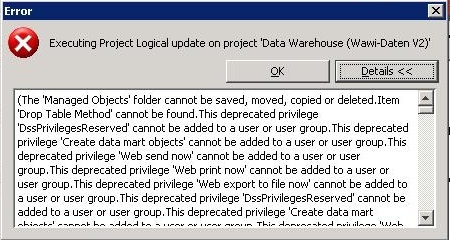
When upgrading a project, the following error is thrown and the upgrade process is interrupted:
ka04W000000Oe6DQAS_0EM440000002DgU.jpeg


The 'Managed Objects' folder cannot be saved, moved, copied or deleted. Item 'Drop Table Method' cannot be found. This deprecated privilege 'DSSPrivilegesReserved' cannot be added to a user or user group...

 
The upgrade log shows the following error:

Internal Error: Update prompt styls failed in loading WebProperties::WebPromptAvailableStyles value from the project object 

 
CAUSE:
One possible cause for this issue is the presence of invalid characters in the WebPromptAvailableStyles property set. This is likely caused by the metadata being restored in a database that does not support all characters used in the project.
 
ACTION:
Contact Strategy Technical Support for further assistance.


Comment

0 comments

Details

Knowledge Article

Published:

April 20, 2017

Last Updated:

February 23, 2023