EducationSoftwareStrategy.com
StrategyCommunity

Knowledge Base

Product

Community

Knowledge Base

TopicsBrowse ArticlesDeveloper Zone

Product

Download SoftwareProduct DocumentationSecurity Hub

Education

Tutorial VideosSolution GalleryEducation courses

Community

GuidelinesGrandmastersEvents
x_social-icon_white.svglinkedin_social-icon_white.svg
Strategy logoCommunity

© Strategy Inc. All Rights Reserved.

LegalTerms of UsePrivacy Policy
  1. Home
  2. Topics

KB370018: Vertical labels truncated in bar graph in Dossier


Community Admin

• Strategy


This Knowledge Base article describes an expected behaviour that may be seen in MicroStrategy Web when a graph bars in Dossier get too close to the edge of the visualization. Two workarounds are suggested.

Starting with the release of Strategy ONE (March 2024), dossiers are also known as dashboards.
SYMPTOM:
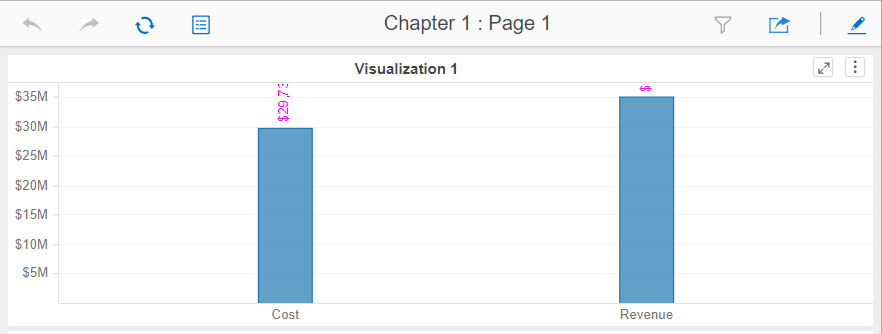
Users may notice, in some scenarios, that the vertical labels are truncated in bar graphs in Dossier, as shown below:
ka0PW0000001JPOYA2_0EM44000000YUga.png

STEPS TO REPRODUCE:

  1. create a new Dossier and add Cost and Profit as dataset 
  2. choose Bar Chart visualization 
  3. add the two metrics to the vertical section and break them by metric name, clustered 
  4. show data labels for all the bars, ensure from the Format panel that overlapping labels are not hidden 
  5. add a visualization below the existing one and reduce the size of the visualization created at step 2. Notice how the data labels remain vertical and are truncated 

CAUSE:
The behaviour is expected by the current design. The labels exceeding the border will be cut off. 
ACTION:
Choose one of the following options:
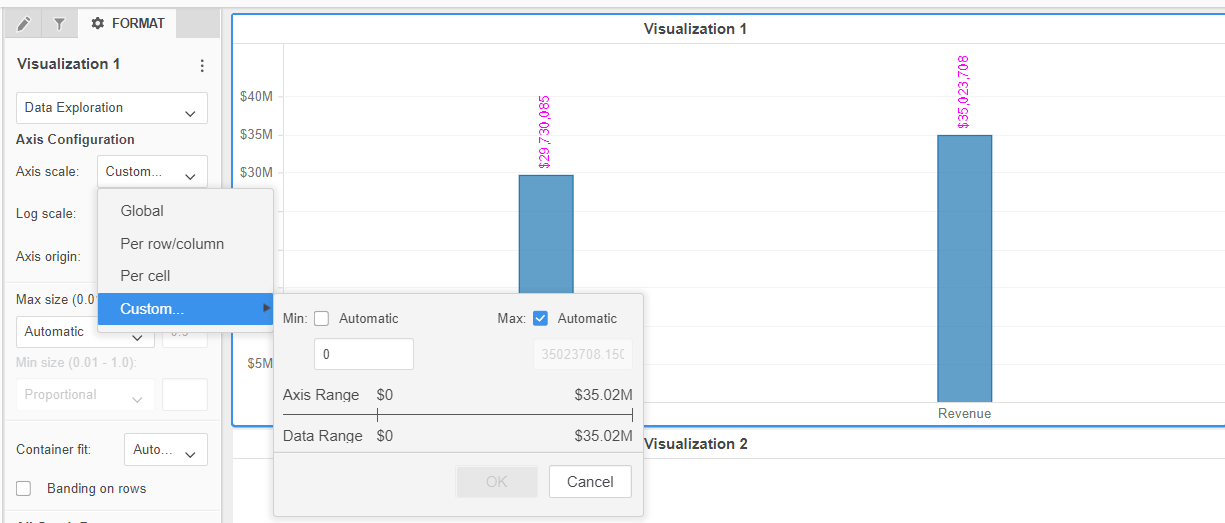
  • adjust the axis scale to increase the space above each bar to show the entire labels (by going to the Property Panel -- Data Exploration -- Axis Scale -- Custom), as shown below: 
ka0PW0000001JPOYA2_0EM44000000YUgu.png
  • hide overlapping labels. This way, users will rely on tooltips and won't misinterpretate the values: 


Comment

0 comments

Details

Knowledge Article

Published:

February 27, 2018

Last Updated:

March 21, 2024