EducationSoftwareStrategy.com
StrategyCommunity

Knowledge Base

Product

Community

Knowledge Base

TopicsBrowse ArticlesDeveloper Zone

Product

Download SoftwareProduct DocumentationSecurity Hub

Education

Tutorial VideosSolution GalleryEducation courses

Community

GuidelinesGrandmastersEvents
x_social-icon_white.svglinkedin_social-icon_white.svg
Strategy logoCommunity

© Strategy Inc. All Rights Reserved.

LegalTerms of UsePrivacy Policy
  1. Home
  2. Topics

KB37077: Why do some History List Messages appear with asterisk in front of the report name in MicroStrategy Desktop and Web 9.x?


Community Admin

• Strategy


SYMPTOM:
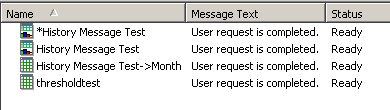
In both Strategy Desktop and Web 9.0.x, users can see asterisks (*) to appear as report name prefixes in the History List:
 

ka04W000000OgbXQAS_0EM4400000027Zi.png

CAUSE:
When a report is added to History with a change made to the report, the history message name will appear with an asterisk in front of the report name. For example,
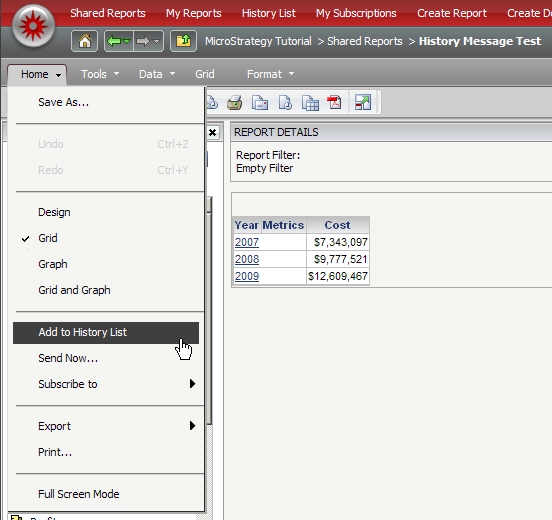
  • Create a report with attribute "Year" and save as "History Message Test"
  • Execute the report on Web and send it to History.
  • Display "All Objects" window to add a metric, "cost." Before saving the change, send the report to History.
     
ka04W000000OgbXQAS_0EM4400000027Zk.png
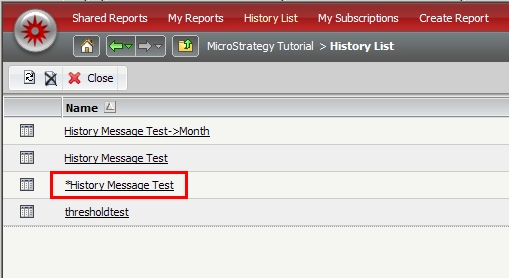
  • Go to History List and confirm there are two Messages with the same name but the one has an asterisks in front of its name.
     
ka04W000000OgbXQAS_0EM4400000027Ze.png


Comment

0 comments

Details

Knowledge Article

Published:

June 13, 2017

Last Updated:

June 13, 2017