EducationSoftwareStrategy.com
StrategyCommunity

Knowledge Base

Product

Community

Knowledge Base

TopicsBrowse ArticlesDeveloper Zone

Product

Download SoftwareProduct DocumentationSecurity Hub

Education

Tutorial VideosSolution GalleryEducation courses

Community

GuidelinesGrandmastersEvents
x_social-icon_white.svglinkedin_social-icon_white.svg
Strategy logoCommunity

© Strategy Inc. All Rights Reserved.

LegalTerms of UsePrivacy Policy
  1. Home
  2. Topics

KB37086: MicroStrategy Web 10.x exports to Excel with formatting have report details in merged cells resulting in incorrect formatting being applied.


Community Admin

• Strategy


MicroStrategy Web 10.x exports to Excel with formatting have report details in merged cells resulting in incorrect formatting being applied.

SYMPTOM:
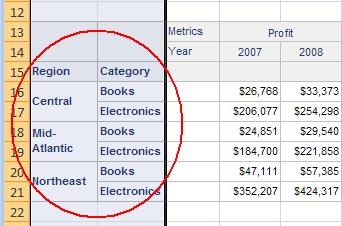
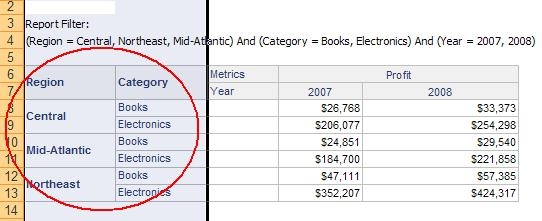
Exporting to Excel with formatting from Strategy Developer 10.x, report details are in individual cells, while the Strategy Web export has report details in merged cells, resulting in incorrect formatting being applied in Excel spreadsheet. 
 
STEPS TO REPRODUCE:
Execute the following in Strategy Tutorial:

  1. Create a report with attributes Region and Category in rows, and in columns the attribute Year and metric Profit.
  2. Execute the report in Developer and in Web, and export from both to Excel with Formatting.
  3. Developer export report details are in individual cells, while Web export has report details in merged cells.
  4. When columns A and B are selected in the Developer and Web Excel exports, and bold formatting selected for the columns, in Developer the two header and data in the columns are assigned bold formatting, while in Web only column A gets assigned bold formatting along with the row header for column B.

Developer :


ka04W000000Oab7QAC_0EM4400000027Zs.jpeg


Web:


ka04W000000Oab7QAC_0EM4400000027Zu.jpeg


CAUSE:
This is due to is due to the limitation of Excel. 
  
WORKAROUND:
Set "remove extra column" option to Yes when export to Excel with formatting as shown below: 
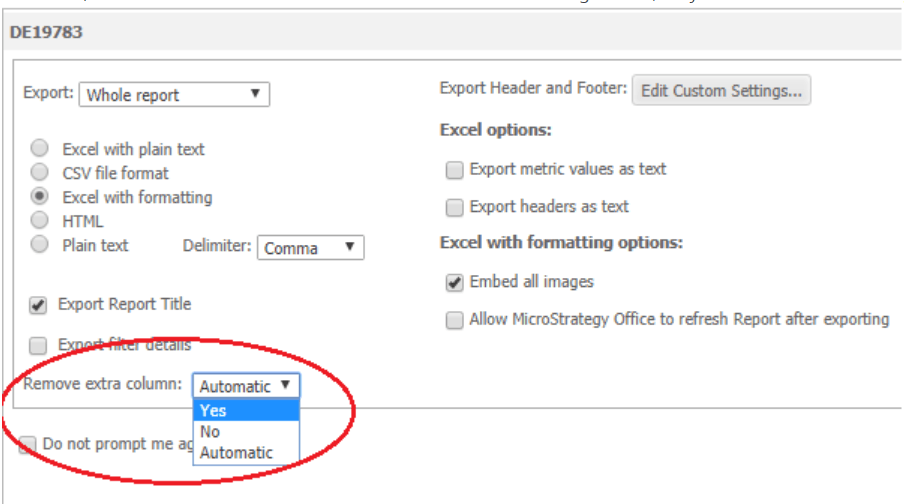
ka04W000000Oab7QAC_0EM44000000WWzE.png

After that, there is no merged cells and is available for format in Excel as shown below: 
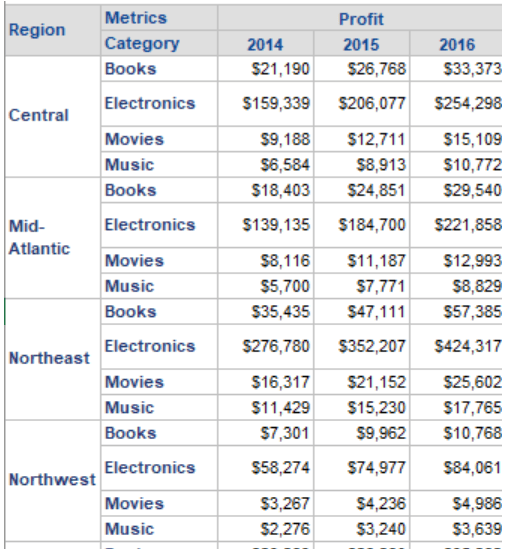
ka04W000000Oab7QAC_0EM44000000WWzJ.png


37086 KB37086


Comment

0 comments

Details

Knowledge Article

Published:

June 16, 2017

Last Updated:

December 6, 2018