SYMPTOM:
When upgrading the Strategy Intelligence Server Components of an already existing environment through Strategy Configuration Wizard 10.x tool, the following error message is thrown:
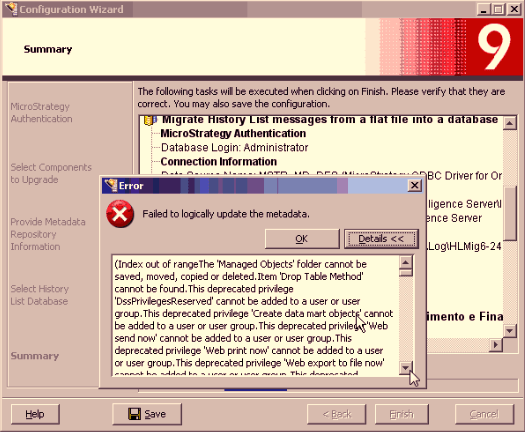
Failed to logically update the metadata.
(Index out of rangeThe 'Managed Objects' folder cannot be saved, moved, copied or deleted.Item 'Drop Table Method' cannot be found.This deprecated privilege 'DssPrivilegesReserved' cannot be added to a user or user group.This deprecated privilege 'Create data mart objects' cannot be added to a user or user group.This deprecated privilege 'Web send now' cannot be added to a user or user group.This deprecated privilege 'Web print now' cannot be added to a user or user group.This deprecated privilege 'Web export to file now' cannot be added to a user or user group.This deprecated privilege 'DssPrivilegesReserved' cannot be added to a user or user group.This deprecated privilege 'Create data mart objects' cannot be added to a user or user group.This deprecated privilege 'Web send now' cannot be added to a user or user group.This deprecated privilege 'Web print now' cannot be added to a user or user group.This deprecated privilege 'Web export to file now' cannot be added to a user or user group.This deprecated privilege 'Web send now' cannot be added to a user or user group.This deprecated privilege 'Web print now' cannot be added to a user or user group.This deprecated privilege 'Web export to file now' cannot be added to a user or user group.This system privilege 'Create configuration objects' cannot be added to a project security role.This system privilege 'DssPrivilegesReserved' cannot be added to a project security role.This system privilege 'Create data mart objects' cannot be added to a project security role.This system privilege 'Create and edit users and groups' cannot be added to a project security role.This system privilege 'Monitor Database Connections' cannot be added to a project security role.This system privilege 'Monitor Cluster' cannot be added to a project security role.This system privilege 'Create and edit database instances and connections' cannot be added to a project security role.This system privilege 'Create and edit schedules and events' cannot be added to a project security role.This system privilege 'Web send now' cannot be added to a project security role.This system privilege 'Use Command Manager' cannot be added to a project security role.This system privilege 'Web print now' cannot be added to a project security role.This system privilege 'Web export to file now' cannot be added to a project security role.This system privilege 'Server performance counter monitoring' cannot be added to a project security role.This system privilege 'Fire events' cannot be added to a project security role.This system privilege 'Create and edit transmitters and devices ' cannot be added to a project security role.This system privilege 'Create and edit contacts and addresses ' cannot be added to a project security role.This system privilege 'Create and edit security roles' cannot be added to a project security role.This system privilege 'Configure contacts data security profile' cannot be added to a project security role.This system privilege 'Reset user password' cannot be added to a project security role.This system privilege 'Link users and groups to external accounts' cannot be added to a project security role.This system privilege 'Grant/Revoke privilege' cannot be added to a project security role.This system privilege 'Configure group membership' cannot be added to a project security role.This system privilege 'Create and edit database logins' cannot be added to a project security role.This system privilege 'Administer cluster' cannot be added to a project security role.This system privilege 'Configure server basic' cannot be added to a project security role.This system privilege 'Configure history lists' cannot be added to a project security role.This system privilege 'Enable user' cannot be added to a project security role.This system privilege 'Administer Database Connections' cannot be added to a project security role.This system privilege 'Enable Intelligence Server administration from Web' cannot be added to a project security role.This system privilege 'Use Command Manager' cannot be added to a project security role.This system privilege 'Server performance counter monitoring' cannot be added to a project security role.This system privilege 'Create and edit security roles' cannot be added to a project security role.Index out of rangeIndex out of rangeIndex out of rangeIndex out of rangeIndex out of rangeIndex out of rangeIndex out of rangeIndex out of rangeIndex out of rangeIndex out of rangeIndex out of rangeIndex out of rangeIndex out of rangeIndex out of rangeIndex out of rangeIndex out of rangeIndex out of rangeIndex out of rangeIndex out of rangeIndex out of rangeIndex out of rangeIndex out of rangeIndex out of rangeIndex out of rangeIndex out of rangeIndex out of rangeIndex out of rangeIndex out of rangeIndex out of rangeIndex out of rangeIndex out of rangeIndex out of rangeIndex out of rangeIndex out of rangeIndex out of rangeIndex out of rangeIndex out of rangeIndex out of rangeIndex out of rangeIndex out of rangeIndex out of rangeIndex out of rangeItem 'Drop Table Method' cannot be found.
...
An unrecoverable error occurred during update. See log file 'C:\Program Files\Common Files\MicroStrategy\Log\MDUPD-6-24.log' for details.)
The error message is recorded in the MDUPD log file which is stored by default, on Windows Operating Systems, under ~\Program Files\Common Files\MicroStrategy\Log.
CAUSE:
This is working as designed. The Update Privileges check box was checked but the source version of privileges was not chosen in the Advanced link. Still, the wizard explains why it is important to inform the source version of privileges at the bottom of the window as in the picture below:
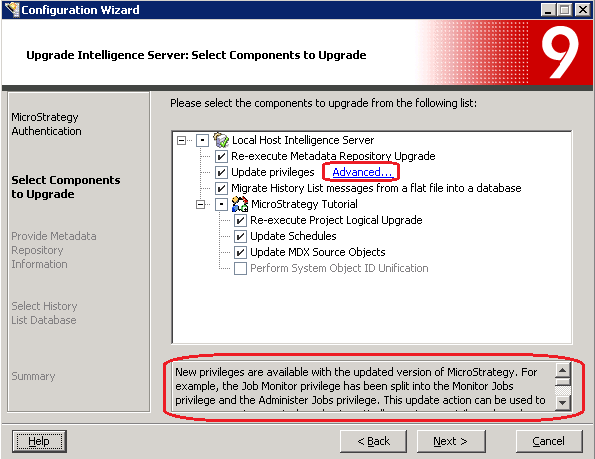
For more information about updating privileges during a metadata upgrade, access the Strategy Configuration Wizard Help by clicking on the button Help.
ACTION:
1. Click on the option Advanced. A window named Configuration Wizard will open.
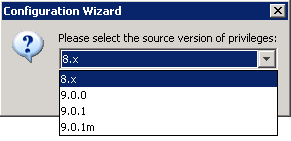
2. From the drop-down list Please select the source version of privileges, select the version of Strategy which privileges will be upgraded from.
