EducationSoftwareStrategy.com
StrategyCommunity

Knowledge Base

Product

Community

Knowledge Base

TopicsBrowse ArticlesDeveloper Zone

Product

Download SoftwareProduct DocumentationSecurity Hub

Education

Tutorial VideosSolution GalleryEducation courses

Community

GuidelinesGrandmastersEvents
x_social-icon_white.svglinkedin_social-icon_white.svg
Strategy logoCommunity

© Strategy Inc. All Rights Reserved.

LegalTerms of UsePrivacy Policy
  1. Home
  2. Topics

KB37144: Automatic mapping does not recognize columns added to existing tables as well as in tables newly added to a project in MicroStrategy Developer 9.4.1.


Stefan Zepeda

Salesforce Solutions Architect • Strategy


KB37144: Automatic mapping does not recognize columns added to existing tables as well as in tables newly added to a project in MicroStrategy Developer 9.4.1.

SYMPTOM:
Consider that a new table 'NEW_TABLE' is to be added to a project through Warehouse Catalog in Strategy Developer 9.4.1. This table contains two columns: SID_ID and NEW_COL, as shown:
 

ka02R000000kbkOQAQ_0EM440000002Dem.png

 
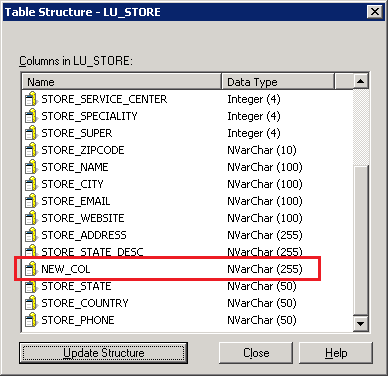
Additionally, a table 'LU_STORE' which is already part of the same project, also has this identical column 'NEW_COL' added to it. Hence, the structure of this table is updated by right-clicking it in Warehouse Catalog and selecting 'Update structure' as shown:
 

ka02R000000kbkOQAQ_0EM440000002Dei.png

 
This adds the column to the 'LU_STORE' table as shown:
 

ka02R000000kbkOQAQ_0EM440000002Dec.png

 
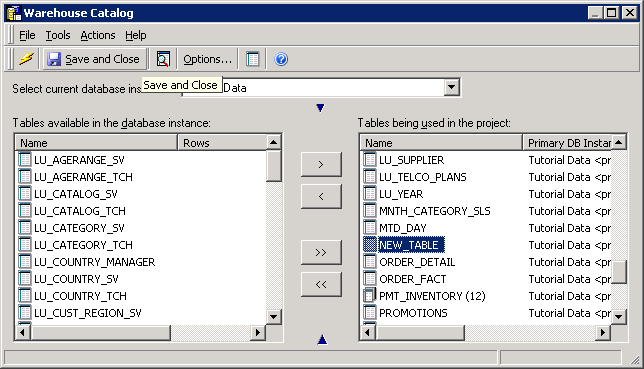
Now, 'NEW_TABLE' is added to the project and Warehouse Catalog is saved and closed:
 

ka02R000000kbkOQAQ_0EM440000002DeY.png

 
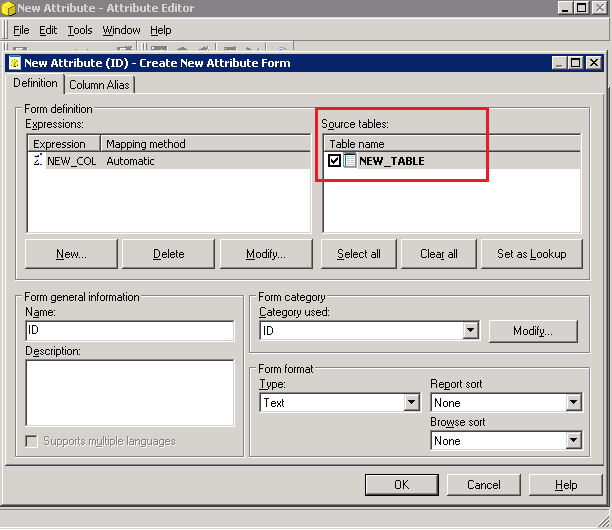
Next, consider that an attribute form mapping to the 'NEW_COL' column is to be created, and the mapping method is set to be Automatic, as shown:
 

ka02R000000kbkOQAQ_0EM440000002DeV.png

 
Automatic mapping does not recognize 'LU_STORE' to be a source table, even though the table contains the 'NEW_COL' column as described before:
 

ka02R000000kbkOQAQ_0EM440000002Deo.png

 
CAUSE:
When the table is added to the project, and the existing table containing the column also present in the new table is updated, duplicate columns are created in the project. Although these columns appear with the same name from Strategy Developer 9.4.1, they are distinct in the metadata, which is why automatic mapping does not recognize all source tables.
 
This is a known metadata inconsistency in Strategy 9.4.1.
 
ACTION:
Strategy will continue to investigate and post updates as soon as they are available.
 
WORKAROUND:
 
In the scenario described above, perform the following steps to workaround the issue:

  • Add the table called 'NEW_TABLE' to the project from Warehouse Catalog.
  • Save and Close Warehouse Catalog.
  • Re-open Warehouse Catalog, go to Tools menu > Options > Catalog > Read Settings, and ensure the 'Column Merging Options' is not set to 'Do not merge':

ka02R000000kbkOQAQ_0EM440000002DeX.png
  • Update structure of the 'LU_STORE' table which includes the column called 'NEW_COL', and Save and Close Warehouse Catalog again.

This process creates the column 'NEW_COL' in the first step, and the same column is re-used when updating structure of the existing table in the fourth step.


Comment

0 comments

Details

Knowledge Article

Published:

June 5, 2017

Last Updated:

June 9, 2017