EducationSoftwareStrategy.com
StrategyCommunity

Knowledge Base

Product

Community

Knowledge Base

TopicsBrowse ArticlesDeveloper Zone

Product

Download SoftwareProduct DocumentationSecurity Hub

Education

Tutorial VideosSolution GalleryEducation courses

Community

GuidelinesGrandmastersEvents
x_social-icon_white.svglinkedin_social-icon_white.svg
Strategy logoCommunity

© Strategy Inc. All Rights Reserved.

LegalTerms of UsePrivacy Policy
  1. Home
  2. Topics

KB37155: When a Report Services Document is executed in Web, the WEBSERVER macro does not display the value specified in the Web Server setting under Project Configuration in MicroStrategy 9.x and 10.x


Community Admin

• Strategy


When a Report Services Document is executed in Web, the WEBSERVER macro does not display the value specified in the Web Server setting under Project Configuration in MicroStrategy 9.x and 10.x

SYMPTOM:
 
When a Report Services document is executed in Strategy Web, the WEBSERVER macro returns http://<web server machine name>/MicroStrategy/asp/Main.aspx instead of displaying the value specified in the Web Server setting located under:
Project Configuration > Project definition > Documents and Reports > Web Server > Specify the web server that will be used to replace WEBSERVER macro in documents
 
STEPS TO REPRODUCE:
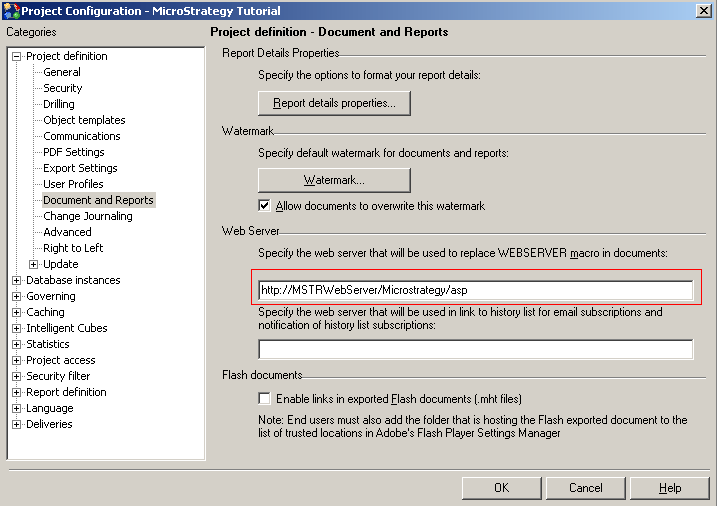
  • In Developer, right-click Strategy Tutorial project and go to Project Configuration > Project definition > Documents and Reports.
  •  Under Web Server > "Specify the web server that will be used to replace WEBSERVER macro in documents", set the URL to a custom value. For example, http://MSTRWebServer/Microstrategy/asp, as shown below:
ka04W000000Oh6gQAC_0EM440000002Abi.png
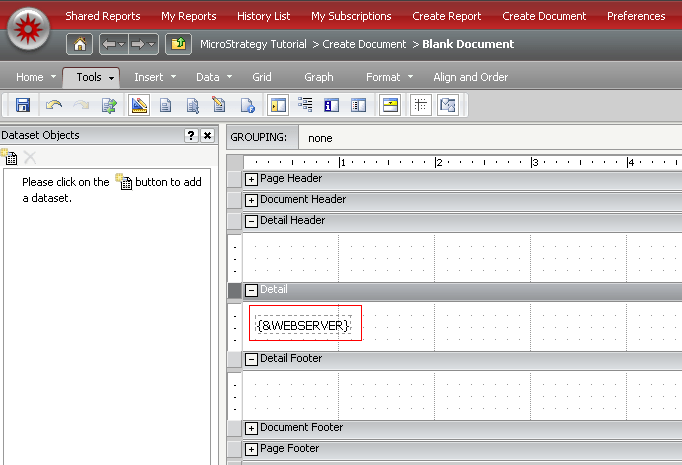
  • Create a blank document in Strategy Web and add the {&WEBSERVER} macro to the Detail section, as shown below:
ka04W000000Oh6gQAC_0EM440000002Abd.png
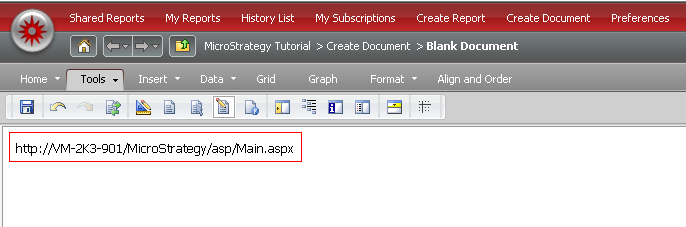
  • Save the document and execute it. The URL appears as http://<web server machine name>/MicroStrategy/asp/Main.aspx 
ka04W000000Oh6gQAC_0EM440000002Abf.png
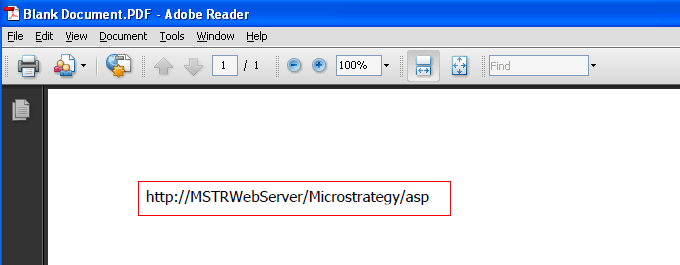
  • Export the document in Strategy Desktop and the value specified in step 2 is displayed, as shown below:
ka04W000000Oh6gQAC_0EM440000002Abg.png

CAUSE:
 
This is working as designed. The <&WEBSERVER> macro is designed for documents executed and exported from Strategy Desktop.

  1. When a document is executed from Web, the Intelligence Server replaces the WEBSERVER macro with the URL of the web server that the request is coming from.
  2. When a document is executed from Desktop, Intelligence Server replaces the WEBSERVER macro with the custom value specified in Project Configuration > Project definition > Documents and Reports > Web Server > Specify the web server that will be used to replace WEBSERVER macro in documents. 
     

ACTION:
 
For Report Services Documents in Web, to display a custom web server address, insert a static text field containing the custom URL instead of using the WEBSERVER macro. 


Comment

0 comments

Details

Knowledge Article

Published:

June 4, 2017

Last Updated:

June 4, 2017