EducationSoftwareStrategy.com
StrategyCommunity

Knowledge Base

Product

Community

Knowledge Base

TopicsBrowse ArticlesDeveloper Zone

Product

Download SoftwareProduct DocumentationSecurity Hub

Education

Tutorial VideosSolution GalleryEducation courses

Community

GuidelinesGrandmastersEvents
x_social-icon_white.svglinkedin_social-icon_white.svg
Strategy logoCommunity

© Strategy Inc. All Rights Reserved.

LegalTerms of UsePrivacy Policy
  1. Home
  2. Topics

KB37186: How to identify and delete profile folders of deleted users through Command Manager 9.x and 10.x?


Community Admin

• Strategy


How to identify and delete profile folders of deleted users through Command Manager 9.x and 10.x?

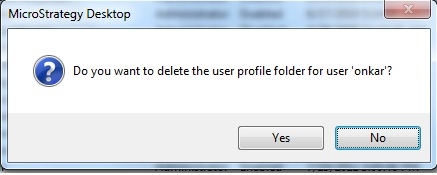
When an Administrator deletes the user through Desktop, it asks if the corresponding profile folder should be deleted as shown below:
 

ka04W000000ObKwQAK_0EM440000002AbT.jpeg

 
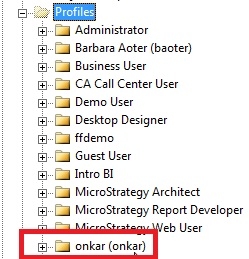
If the administrator does not chose to delete the profile folder, then the folder remains in the metadata for the deleted user as shown below:
 

ka04W000000ObKwQAK_0EM440000002AbV.jpeg

 
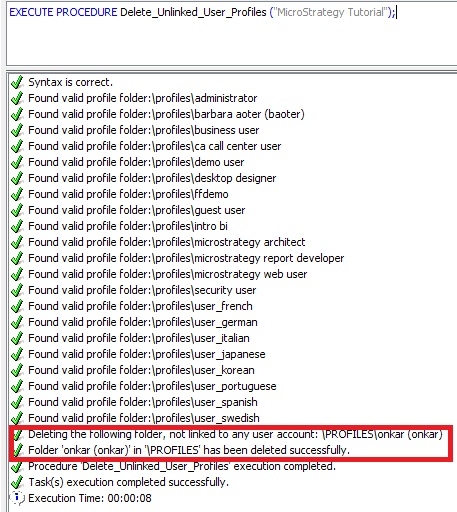
Such profile folders for which users do not exist anymore can be identified and deleted using a sample Command Manager procedure/outline.    
The outline is called as Delete_Unlinked_User_Profiles available under Procedure_Outlines -> Sample_Procedures section. This procedure needs to be supplied with the project name for which the profile folders have to be identified and deleted as shown below:
 

ka04W000000ObKwQAK_0EM440000002AbQ.jpeg

Comment

0 comments

Details

Knowledge Article

Published:

June 5, 2017

Last Updated:

June 5, 2017