SYMPTOM:
Consider that a prompt object is created which grants 'View' Access Control List (ACL) permission to a user called 'architect', as shown:
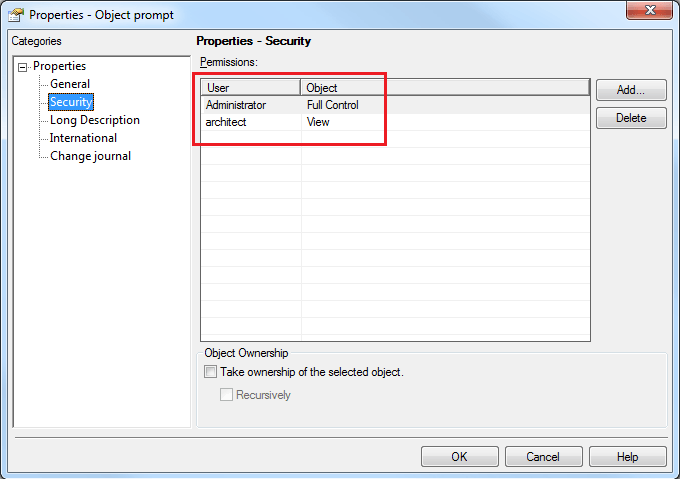
Consider that the parent folder of this prompt object called 'Test' does not grant any ACL permission to this user, as shown:

When this 'architect' user logs in to Strategy Developer 9.x, the above folder is not visible to the user. However, if the user creates a search which should retrieve the prompt object (such as searching by the object name or a blank search with object type 'Prompt'), the prompt object can be found along with its path:
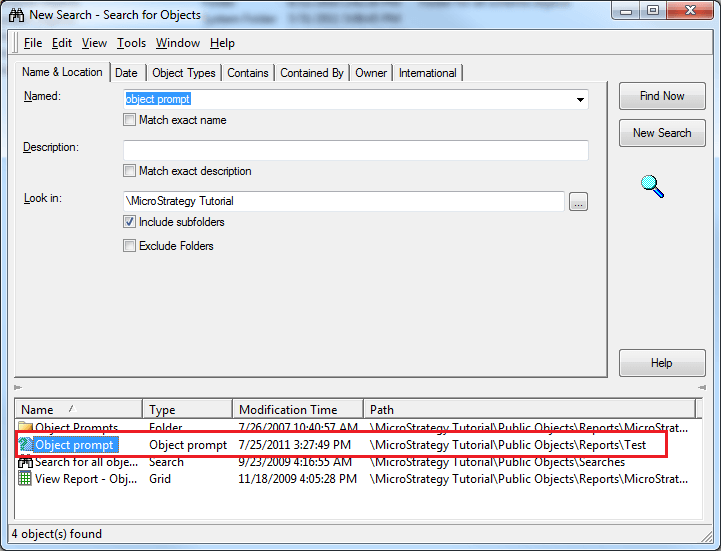
The 'architect' user can then edit this prompt from Strategy Developer 9.x.
Note: This behavior can be observed for any object type. Prompt object is only used as an example above.
CAUSE:
This is working by design. When an access check is performed on an object, the outcome is determined solely by considering the ACL of the object in question. The ACL of its parent folder is not considered. When a user is not granted access to a folder, the user is disallowed from listing the objects in the folder. This does not mean that the user cannot access the objects in the folder by any other means (such as a search object in this case).
ACTION:
No action is necessary since this behavior is by design. If the requirement is to deny access to all objects in a folder along with the folder, the folder permissions can be propagated to all its children objects by selecting 'Apply changes in permissions to all children objects' and 'Overwrite children's access control lists' options from the Security section, as shown:

If the same needs to be done to objects within its sub-folders, the 'Recursively' option shown above can be selected as well.
