EducationSoftwareStrategy.com
StrategyCommunity

Knowledge Base

Product

Community

Knowledge Base

TopicsBrowse ArticlesDeveloper Zone

Product

Download SoftwareProduct DocumentationSecurity Hub

Education

Tutorial VideosSolution GalleryEducation courses

Community

GuidelinesGrandmastersEvents
x_social-icon_white.svglinkedin_social-icon_white.svg
Strategy logoCommunity

© Strategy Inc. All Rights Reserved.

LegalTerms of UsePrivacy Policy
  1. Home
  2. Topics

KB37204: How to disable "Email Screen’" option for a report on iPad in MicroStrategy Mobile 9.x and 10.x


Community Admin

• Strategy


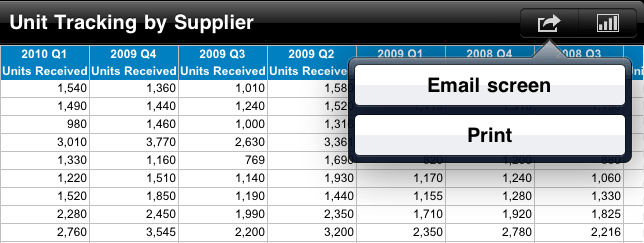
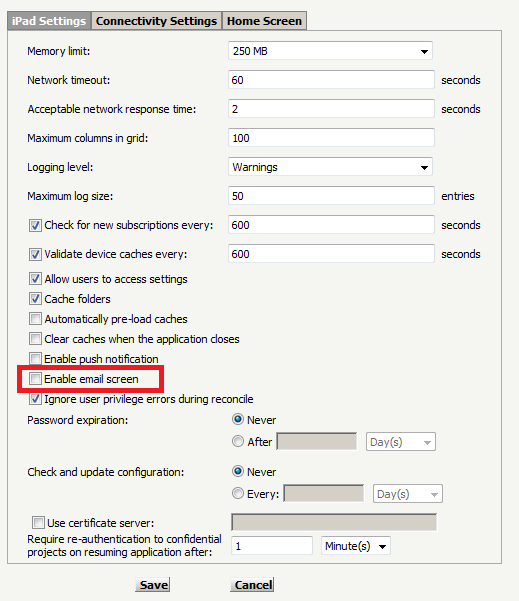
Open MicroStrategy Mobile on an iPad and run a report, click on the arrow icon on the top left corner, there is a pop-up option "Email screen", as shown below: In MicroStrategy Mobile 9.x and 10.x, there is a new checkbox to enable/disable the option "Email Screen" in iPad settings, as shown below:

Open Strategy Mobile on an iPad and run a report, click on the arrow icon on the top left corner, there is a pop-up option "Email screen", as shown below:
 

ka04W000000Oba1QAC_0EM440000002AOX.png

 
In Strategy Mobile 9.x and 10.x, there is a new checkbox to enable/disable the option "Email Screen" in iPad settings, as shown below:
 

ka04W000000Oba1QAC_0EM440000002AOR.png

 
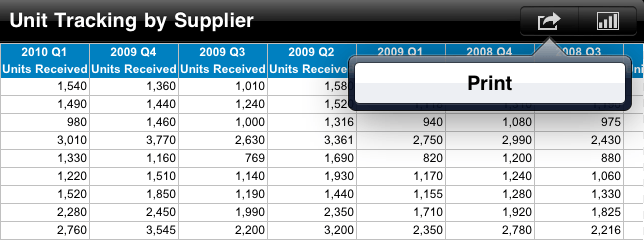
The option "Email screen" can be disabled by unchecking "Enable email screen", as shown below:


ka04W000000Oba1QAC_0EM440000002AOU.png


Comment

0 comments

Details

Knowledge Article

Published:

May 31, 2017

Last Updated:

May 31, 2017