EducationSoftwareStrategy.com
StrategyCommunity

Knowledge Base

Product

Community

Knowledge Base

TopicsBrowse ArticlesDeveloper Zone

Product

Download SoftwareProduct DocumentationSecurity Hub

Education

Tutorial VideosSolution GalleryEducation courses

Community

GuidelinesGrandmastersEvents
x_social-icon_white.svglinkedin_social-icon_white.svg
Strategy logoCommunity

© Strategy Inc. All Rights Reserved.

LegalTerms of UsePrivacy Policy
  1. Home
  2. Topics

KB37208: Conditional formatting settings do not take effect in a Report Services Document when being placed on a text box with a case statement in MicroStrategy 9.x


Stefan Zepeda

Salesforce Solutions Architect • Strategy


Conditional formatting settings do not take effect in a Report Services Document when being placed on a text box with a case statement in MicroStrategy 9.x

SYMPTOM:
 
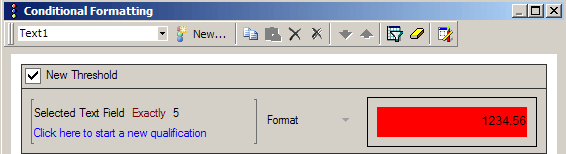
Conditional formatting does not work when applied to a text box in Strategy 9.x when doing an exact qualification on the field.  Below is an example of an exact qualification:
 

ka02R000000kbsJQAQ_0EM440000002Ddw.png

 
CAUSE:
 
This issue is caused by extra spacing that is in the text box.  For example, in the following case statement below notice that after the last bracket "}" there is an additional space. 
 
"{Case((Revenue > ),5,(Revenue > ( - (Abs() * 0.1))),1,2)} "
 
When case statements are being used the datatype is set to character.  In the syntax above, the conditional formatting is set to "Selected Text Field Exactly 5" which will cause this issue will occur.  When the condition is being processed, it will try to apply the condition "5 " not "5". 
 
ACTION:
 
In order to resolve the issue the additional space at the end of the statement needs to be removed.


Comment

0 comments

Details

Knowledge Article

Published:

June 7, 2017

Last Updated:

June 7, 2017