EducationSoftwareStrategy.com
StrategyCommunity

Knowledge Base

Product

Community

Knowledge Base

TopicsBrowse ArticlesDeveloper Zone

Product

Download SoftwareProduct DocumentationSecurity Hub

Education

Tutorial VideosSolution GalleryEducation courses

Community

GuidelinesGrandmastersEvents
x_social-icon_white.svglinkedin_social-icon_white.svg
Strategy logoCommunity

© Strategy Inc. All Rights Reserved.

LegalTerms of UsePrivacy Policy
  1. Home
  2. Topics

KB37222: How the "Transformable Aggmetric" VLDB setting works in MicroStrategy Engine 9.x-10.x


Community Admin

• Strategy


The 'Transformable Aggmetric' VLDB setting was introduced in Strategy 9.0.0. It allows user to control what metrics to be utilized to perform transformations on compound metrics with nested aggregation.
 
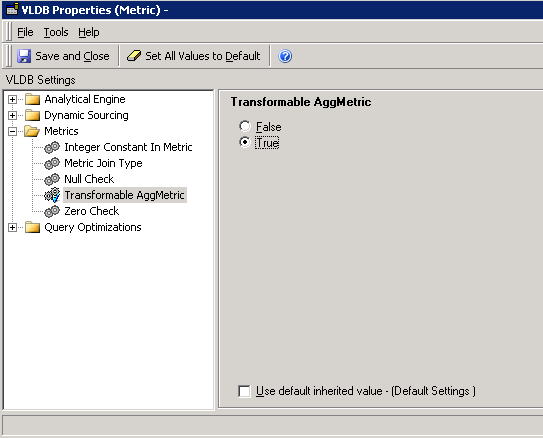
This VLDB setting is located in metric editors, as shown below. 
ka04W000000ObdZQAS_0EM440000002Dcg.png


  • Navigate to Tools > Advanced Settings > VLDB Properties to open the VLDB properties editor.
  • Go to Tools menu to enable the option “Show advanced settings” if it is not.
  • In the Metrics folder, two available options are shown as below:
  • 'Transformable Aggmetric' -- False
  • 'Transformable Aggmetric' -- True 

This VLDB setting is only available at metric level. The default value of this setting is False. It can only be applied when the following conditions are met.

  1. The property will only apply when the metric is an aggregatable metric. Aggregatable means that the metric contains an aggregation function as its root like “Sum(Revenue)” or “Sum(M01)”.
  2. The property will only apply when adding a transformation metric, like normal transformation, variance or variance percentage. To achieve this operation go to the report editor and right click on a metric then select from the menu Insert > Transformation, then a menu will appear with all the transformations available, if we select one we will be able to apply the selected transformation to the clicked metric.
  3. The property will only apply when the aggregation function contains as arguments other metrics (not facts).

If this option is set to True, the transformation will be applied to the children metrics within the aggregation function.
If this option is set to False, the transformation will be applied to the aggregatable metric instead of the children metrics. 
 
Take the following example in Strategy Tutorial project to illustrate how this VLDB setting works:
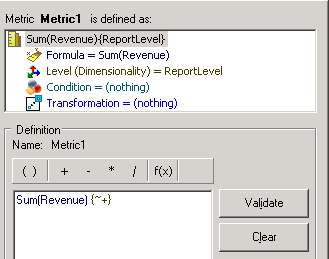
 

  • Create a metric Metric1 with expression sum(Revenue) as shown below:
ka04W000000ObdZQAS_0EM440000002Dd2.png
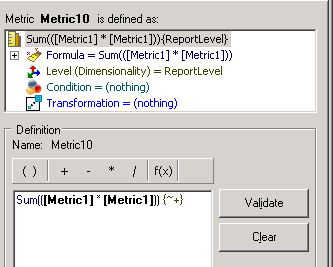
  • Create a metric Metric10 with expression sum(Metric1 *Metric1 ) as shown below. Set the 'Transformable Aggmetric' option to False.                                                                                   
ka04W000000ObdZQAS_0EM440000002Dcs.png
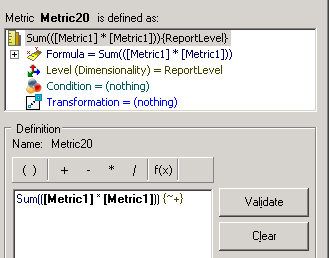
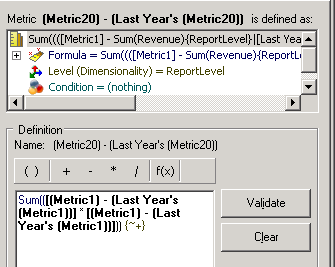
  • Create a metric Metric20 with expression sum(Metric1 *Metric1 ) as shown below. Set the 'Transformable Aggmetric' option to True.                                                                               
ka04W000000ObdZQAS_0EM440000002Dcy.png
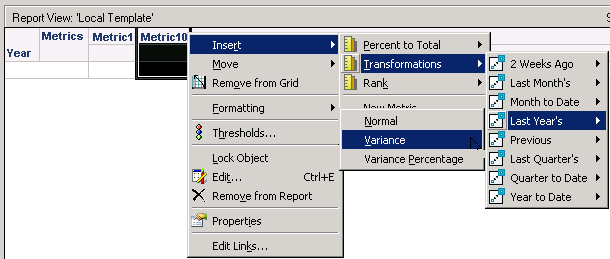
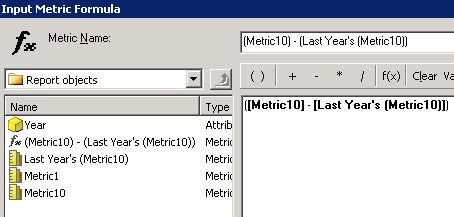
  • Create a report with attribute Year, metric Metric1, Metric10, and last year's varience transformation for Metric10 as shown below:                                                                                                                                               
ka04W000000ObdZQAS_0EM440000002Dch.png
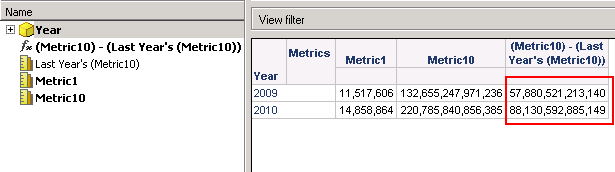
  • Run the report and right click the transformation metric to check the defition as shown below.
ka04W000000ObdZQAS_0EM440000002Dd0.png
ka04W000000ObdZQAS_0EM440000002Dd1.png
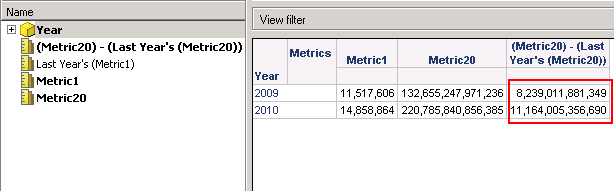
  • Create a report with attribute Year, metric Metric1, Metric20, and last year's varience transformation for Metric20.
  • Run the report and right click the transformation metric to check the defition, as shown below.
ka04W000000ObdZQAS_0EM440000002Dcz.png


ka04W000000ObdZQAS_0EM440000002Dct.png


Note the different SQLs generated for the transformation metric.                                                                                             
 

Transformable Aggmetric -False

Transformable Aggmetric -True

create table ZZMD00 (

                YEAR_ID SHORT,

                WJXBFS1               DOUBLE)


insert into ZZMD00

select      a11. AS YEAR_ID,

                sum(a11.) AS WJXBFS1

from                  a11

group by a11.


create table ZZMD01 (

                YEAR_ID SHORT,

                WJXBFS1               DOUBLE)


insert into ZZMD01

select      pa11. AS YEAR_ID,

                IIF(ISNULL((pa11. * pa11.)), 0, (pa11. * pa11.)) AS WJXBFS1

from                        pa11


create table ZZMD02 (

                YEAR_ID SHORT,

                WJXBFS1               DOUBLE)


insert into ZZMD02

select      a12. AS YEAR_ID,

                IIF(ISNULL((pa11. * pa11.)), 0, (pa11. * pa11.)) AS WJXBFS1

from        (              pa11

                inner join                             a12

                  on         (pa11. = a12.))


select      pa11. AS YEAR_ID,

                pa11. AS WJXBFS1,

                pa12. AS WJXBFS2,

                pa13. AS WJXBFS3

from        ((             pa11

                inner join                               pa12

                  on         (pa11. = pa12.))

                inner join                               pa13

                  on         (pa11. = pa13.))


drop table ZZMD00


drop table ZZMD01


drop table ZZMD02


create table ZZMD00 (

                YEAR_ID SHORT,

                WJXBFS1               DOUBLE)


insert into ZZMD00

select      a11. AS YEAR_ID,

                sum(a11.) AS WJXBFS1

from                  a11

group by a11.


create table ZZMD01 (

                YEAR_ID SHORT,

                WJXBFS1               DOUBLE)


insert into ZZMD01

select      pa11. AS YEAR_ID,

                IIF(ISNULL((pa11. * pa11.)), 0, (pa11. * pa11.)) AS WJXBFS1

from                        pa11


create table ZZMD02 (

                YEAR_ID SHORT,

                WJXBFS1               DOUBLE)


insert into ZZMD02

select      a12. AS YEAR_ID,

                sum(a11.) AS WJXBFS1

from        (        a11

                inner join                             a12

                  on         (a11. = a12.))

group by a12.


create table ZZMD03 (

                YEAR_ID SHORT,

                WJXBFS1               DOUBLE)


insert into ZZMD03

select      pa11. AS YEAR_ID,

                IIF(ISNULL(((IIF(ISNULL(pa11.), 0, pa11.) - IIF(ISNULL(pa12.), 0, pa12.)) * (IIF(ISNULL(pa11.), 0, pa11.) - IIF(ISNULL(pa12.), 0, pa12.)))), 0, ((IIF(ISNULL(pa11.), 0, pa11.) - IIF(ISNULL(pa12.), 0, pa12.)) * (IIF(ISNULL(pa11.), 0, pa11.) - IIF(ISNULL(pa12.), 0, pa12.)))) AS WJXBFS1

from        (              pa11

                inner join                               pa12

                  on         (pa11. = pa12.))


select      pa11. AS YEAR_ID,

                pa11. AS WJXBFS1,

                pa12. AS WJXBFS2,

                pa13. AS WJXBFS3,

                pa14. AS WJXBFS4

from        (((            pa11

                inner join                               pa12

                  on         (pa11. = pa12.))

                inner join                               pa13

                  on         (pa11. = pa13.))

                inner join                               pa14

                  on         (pa11. = pa14.))


drop table ZZMD00


drop table ZZMD01


drop table ZZMD02


drop table ZZMD03


Comment

0 comments

Details

Knowledge Article

Published:

May 22, 2017

Last Updated:

May 22, 2017