EducationSoftwareStrategy.com
StrategyCommunity

Knowledge Base

Product

Community

Knowledge Base

TopicsBrowse ArticlesDeveloper Zone

Product

Download SoftwareProduct DocumentationSecurity Hub

Education

Tutorial VideosSolution GalleryEducation courses

Community

GuidelinesGrandmastersEvents
x_social-icon_white.svglinkedin_social-icon_white.svg
Strategy logoCommunity

© Strategy Inc. All Rights Reserved.

LegalTerms of UsePrivacy Policy
  1. Home
  2. Topics

KB37224: Multisource option is grayed out despite receiving the following message when applying license key: For successful upgrade, the following actions need to be taken. You will need to remove the following products MicroStrategy MultiSource


Community Admin

• Strategy


This Knowledge Base article describes an issue that occurs in prior versions of MicroStrategy License Manager in versions prior to 9.3.1 when applying a license key on a machine on which a different key containing the Multisource option has previously been installed.

SYMPTOM:
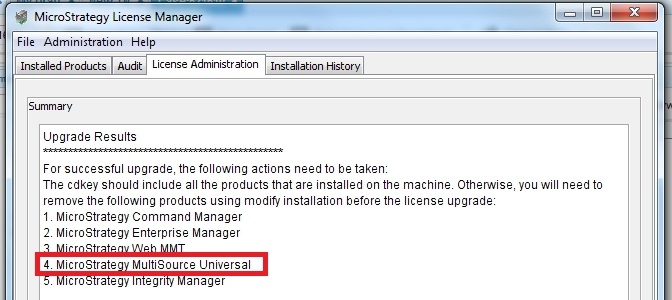
When applying a license key on a machine on which a different key containing the Multisource option has previously been installed, the following message appears in prior versions of Strategy License Manager 9.3.1:
ka04W000000OehMQAS_0EM440000002AbR.jpeg


For successful update, the following actions need to be taken:
The cdkey should include all the products that are installed on the machine. Otherwise, you will need to remove the following products that are installed on the machine. Otherwise, you will need to remove the following products using modify installation before the license upgrade:
Strategy Multisource Universal
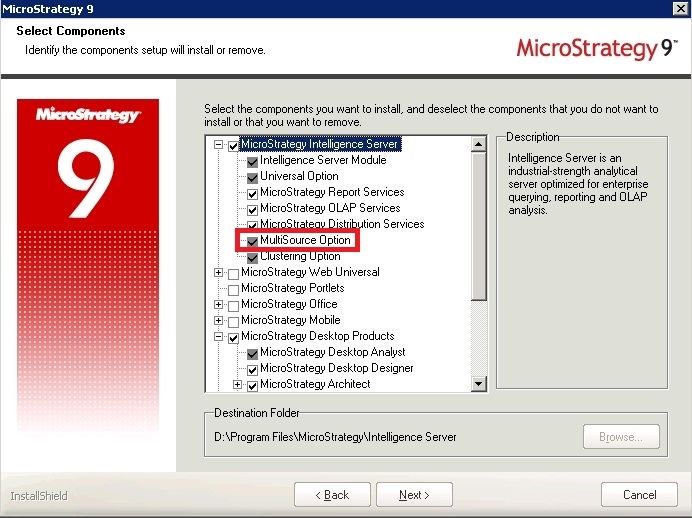
This would be expected in the situation where the key being applied does not incorporate the Multisource product. However, when attempting to modify the installation to remove this product, it can be noted that the Multisource option is grayed out and cannot, therefore, be unchecked:

ka04W000000OehMQAS_0EM440000002AbM.jpeg

CAUSE:
The Multisource option is an add-on to the Intelligence Server product and, as such, cannot be removed independently of this component.
 
ACTION:
This issue has been addressed in Strategy 9.3.1. Upgrade to that version to take advantage of this fix.
WORKAROUND: 
The reference to Multi-source can be avoided by removing and then re-installing the Intelligence Server product. 


37224


Comment

0 comments

Details

Knowledge Article

Published:

June 7, 2017

Last Updated:

June 7, 2017