EducationSoftwareStrategy.com
StrategyCommunity

Knowledge Base

Product

Community

Knowledge Base

TopicsBrowse ArticlesDeveloper Zone

Product

Download SoftwareProduct DocumentationSecurity Hub

Education

Tutorial VideosSolution GalleryEducation courses

Community

GuidelinesGrandmastersEvents
x_social-icon_white.svglinkedin_social-icon_white.svg
Strategy logoCommunity

© Strategy Inc. All Rights Reserved.

LegalTerms of UsePrivacy Policy
  1. Home
  2. Topics

KB37251: Date formatting in MicroStrategy Command Manager 9.x is always in English (US) format.


Community Admin

• Strategy


SYMPTOM:
Users might observe that even if the regional settings with respect to date formatting of the Strategy Command Manager 9.x client machine are changed, any dates output by Strategy Command Manager 9.x  continue to be in English (US) format.
 
STEPS TO REPRODUCE:
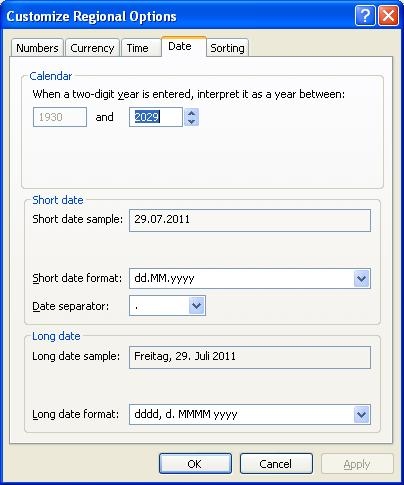
Change the Regional Setting as displayed in the picture below:
 

ka04W000000OgsJQAS_0EM440000002AbS.jpeg


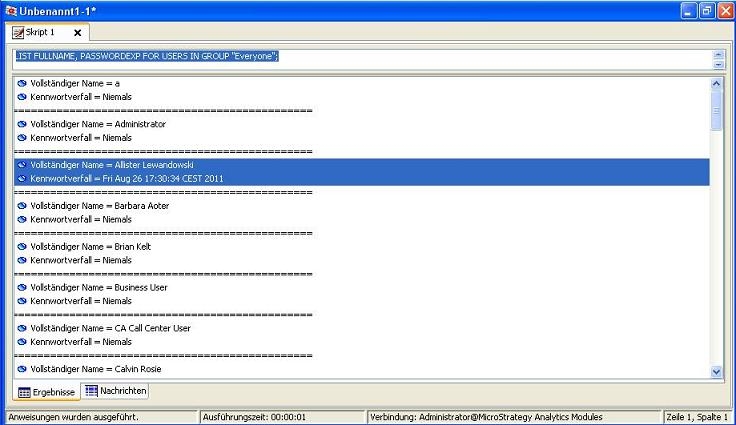
Use e.g. the Command LIST FULLNAME, PASSWORDEXP FOR USERS IN GROUP "Everyone"; the following result will be displayed:
 

ka04W000000OgsJQAS_0EM440000002AbX.jpeg


CAUSE:
This behavior is by design. Date formatting in Strategy Command Manager 9.x input and output should always be in English (US) format.
 
ACTION:
An enhancement request has been logged such that Strategy Command Manager 9.x uses the date formatting specified in the Regional settings of the client machine. Contact Strategy Technical Support for an update on the status of this request.


Comment

0 comments

Details

Knowledge Article

Published:

June 8, 2017

Last Updated:

June 8, 2017