EducationSoftwareStrategy.com
StrategyCommunity

Knowledge Base

Product

Community

Knowledge Base

TopicsBrowse ArticlesDeveloper Zone

Product

Download SoftwareProduct DocumentationSecurity Hub

Education

Tutorial VideosSolution GalleryEducation courses

Community

GuidelinesGrandmastersEvents
x_social-icon_white.svglinkedin_social-icon_white.svg
Strategy logoCommunity

© Strategy Inc. All Rights Reserved.

LegalTerms of UsePrivacy Policy
  1. Home
  2. Topics

KB37253: "The chosen machine (machine name) is currently being used by system ‘Tutorial System’" error occurs when configuring an existing MicroStrategy Narrowcast Server 9.x system after an upgrade or re-install


Community Admin

• Strategy


When going through the System Configuration wizard of MicroStrategy Narrowcast Server 9.x after an upgrade or re-install, the following error message may appear when attempting to configure the machine: "The chosen machine (machine name) is currently being used by the system 'Tutorial System'."

SYMPTOM:
When going through the System Configuration wizard of Strategy Narrowcast Server 9.x after an upgrade or re-install, the following error message may appear when attempting to configure the machine:

ka04W000001MKt0QAG_0EM440000002Aau.jpeg


The chosen machine (machine name) is currently being used by the system 'Tutorial System'. Unless this machine is removed from that system, the new system will not function properly. You can free this machine by either destroying the system 'Tutorial System' or removing the Distribution Manager, Execution Engine, and Strategy Logging Server references in that system that point to this machine.
 
CAUSE:
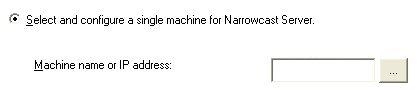
This message is caused because another system is already being used as the Distribution Manager and Execution Engine on the machine specified in the Clustering section of system configuration as shown below:

ka04W000001MKt0QAG_0EM440000002Aal.jpeg

Each machine can have at most one system configured as the Distribution Manager and Execution engine. When the Tutorial system is selected during install, this is automatically registered causing this error.
 
ACTION:
To resolve the issue, follow the steps below: 
  • Open Strategy Narrowcast Administrator 9.x console.
  • Go to System -> TutorialSystem(or name of the system listed in the error message) -> Edit system configuration
  • Go to the Clustering section.
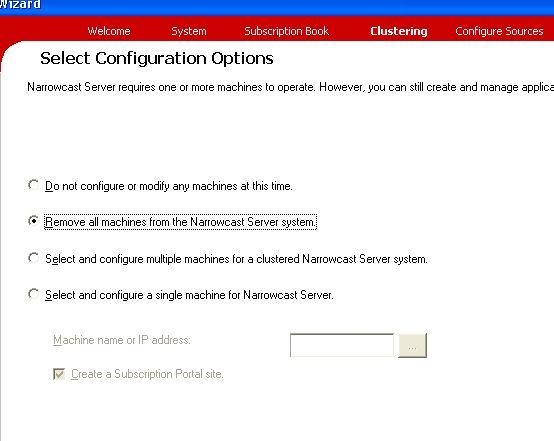
  • Select the option "Remove all machines from the Narrowcast Server system":
ka04W000001MKt0QAG_0EM440000002Aap.jpeg

 
In some cases, this option is disabled. In other instances the system may have been destroyed or is no longer accessible for a different reason. In these instances, it will be required to manually, modify the registry to remove traces of the system.
  • Open Registry editor by going to Start > Run > regedit.
  • Navigate to the appropriate registry key for the operating system :

    32-Bit OS:    HKEY_LOCAL_MACHINE\Software\MicroStrategy\Strategy Broadcast Server\7.0\Setup
    64-Bit OS:    HKEY_LOCAL_MACHINE\Software\Wow6432Node\MicroStrategy\Strategy Broadcast Server\7.0\Setup

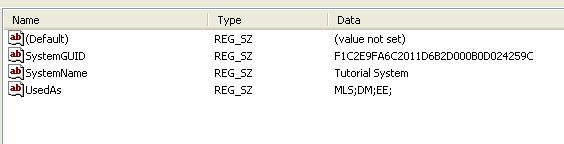
  • Remove the following three keys:
    • SystemGUID
    • SystemName
    • UsedAs
ka04W000001MKt0QAG_0EM440000002Aan.jpeg

 
WARNING:
Modifying registry values incorrectly may cause serious, system-wide problems that may require the re-installation of Microsoft Windows NT. Any edit of the registry is done at the user's own risk. Since these are user-initiated changes, they are not covered by any Strategy warranty. If using Microsoft Windows NT, the user should backup the registry and/or update an Emergency Repair Disk (ERD) prior to alterations.


Comment

0 comments

Details

Knowledge Article

Published:

April 4, 2017

Last Updated:

April 4, 2017