EducationSoftwareStrategy.com
StrategyCommunity

Knowledge Base

Product

Community

Knowledge Base

TopicsBrowse ArticlesDeveloper Zone

Product

Download SoftwareProduct DocumentationSecurity Hub

Education

Tutorial VideosSolution GalleryEducation courses

Community

GuidelinesGrandmastersEvents
x_social-icon_white.svglinkedin_social-icon_white.svg
Strategy logoCommunity

© Strategy Inc. All Rights Reserved.

LegalTerms of UsePrivacy Policy
  1. Home
  2. Topics

KB37284: "Caching is disabled" error occurs even though caching is enabled at the project level and report level in MicroStrategy 9.x and later


Community Admin

• Strategy


When a MicroStrategy user executes a report, no cache is created. 

SYMPTOM:
 
When a Strategy user executes a report, no cache is created.  In the cache trace the following entry can be seen:


Caching is disabled. No need to update it.
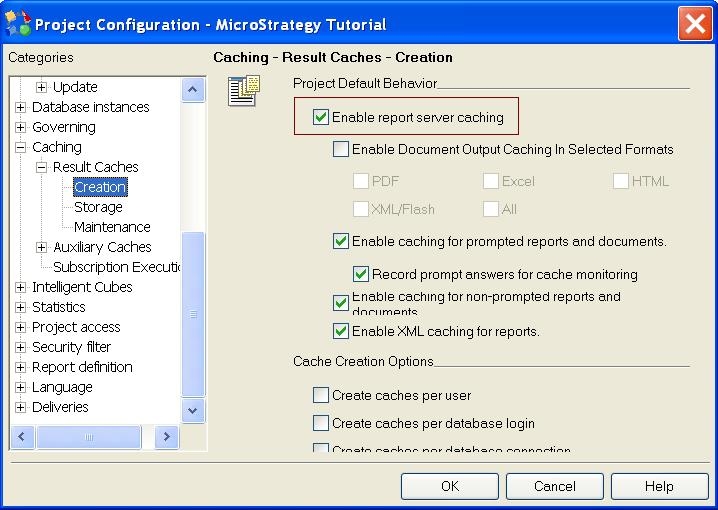
 
When checking the report level caching options from "Project Configuration > Caching > Result Caches > Creation" it can be seen that report server caching is enabled:
 

ka04W000000OdWoQAK_0EM440000002Dc0.jpeg

 
When checking the report level caching options from "Data > Report Caching Options" it can be seen that caching is enabled:
 

ka04W000000OdWoQAK_0EM440000002DcD.png

 
When checking the Strategy user privileges from "User Editor > User Definition > Project Access > Common Privileges", the Strategy user has the privilege to use server cache for the project:
 

ka04W000000OdWoQAK_0EM440000002Dbt.png


Additionally, it may be seen that other Strategy users can  create caches without any issue.
 
CAUSE:
 
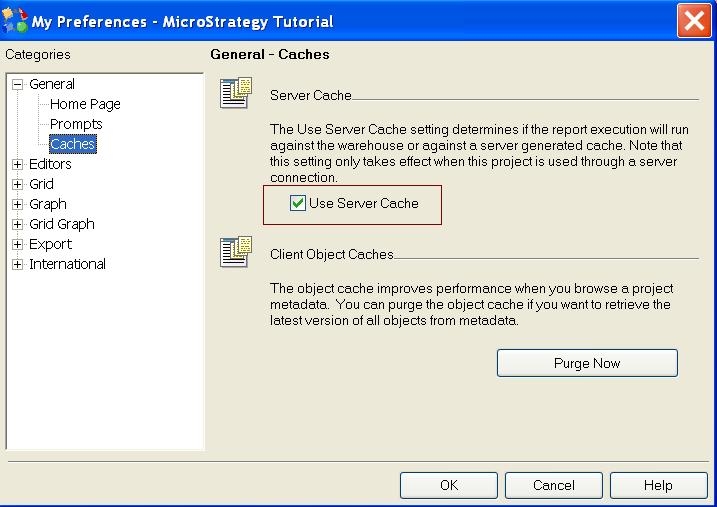
The option to use Server cache may be disabled at the Strategy user preferences level for the project.
 
ACTION:
 
While logged in as the Strategy user who cannot create caches, right click the project and select "My Preferences"
 

ka04W000000OdWoQAK_0EM440000002Dbv.png

 
In the Preferences window navigate to "General > Caches" and ensure "Use Server Cache" is selected
 

ka04W000000OdWoQAK_0EM440000002Dbu.jpeg


Comment

0 comments

Details

Knowledge Article

Published:

April 10, 2017

Last Updated:

April 10, 2017