EducationSoftwareStrategy.com
StrategyCommunity

Knowledge Base

Product

Community

Knowledge Base

TopicsBrowse ArticlesDeveloper Zone

Product

Download SoftwareProduct DocumentationSecurity Hub

Education

Tutorial VideosSolution GalleryEducation courses

Community

GuidelinesGrandmastersEvents
x_social-icon_white.svglinkedin_social-icon_white.svg
Strategy logoCommunity

© Strategy Inc. All Rights Reserved.

LegalTerms of UsePrivacy Policy
  1. Home
  2. Topics

KB37316: What methods are available to determine the sender and/or owner of a report or document subscription that a given user is the recipient in MicroStrategy Developer


Stefan Zepeda

Salesforce Solutions Architect • Strategy


KB37316: What methods are available to determine the sender and/or owner of a report or document subscription that a given user is the recipient in MicroStrategy Developer

There are two simple methods that can be used to determine the owner/creator of a subscription given a subscription or report name:
 
Using Subscription Monitor in Strategy Developer
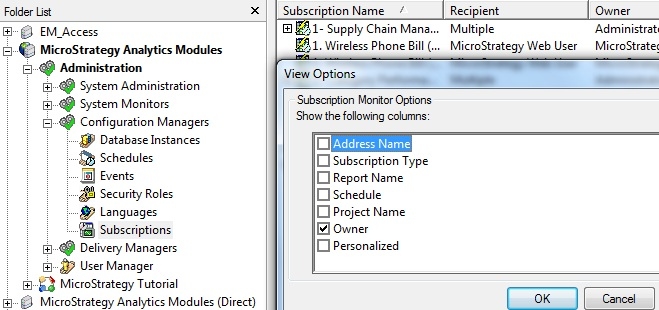
  • Navigate to Subscription Monitor in Strategy Developer
  • Right-click and go to 'View Options' where it is possible to enable the Owner field
ka0PW0000002yT7YAI_0EM440000002DbQ.jpeg

From the right-click menu, it is also possible to create a filter based on fields in case there are a number of subscription messages to go through.
 
Using the actual report that is received

  • If the user can locate the report that is being delivered via the subscription, they can check for dependent subscriptions of that report by right-clicking on the report and selecting 'Search for dependent subscriptions'.
  • The resulting screen shows any subscriptions that are dependent on the given report or document, along with displaying the Owner field so the user can determine who created the subscription.
ka0PW0000002yT7YAI_0EM440000002DbZ.jpeg


Comment

0 comments

Details

Knowledge Article

Published:

June 19, 2017

Last Updated:

August 12, 2024